loadstring(game:HttpGet("https://raw.githubusercontent.com/paozinkkj/MultiScripts/refs/heads/main/Entrenchered.lua"))()
Features & Information
👤 Tab: Main
Socials & Info:
Discord Label: Displays the community link.
YouTube Label: Displays the channel handle.
Copy Discord (Button): Copies the invite link to the clipboard.
Copy YouTube (Button): Copies the channel link to the clipboard.
👁️ Tab: Visuals
ESP Settings:
Enable Visuals (Toggle): Master switch for all ESP and visual features.
Names (Toggle): Displays player usernames above their characters.
Distance (Toggle): Displays the distance to the player in meters.
Weapon (Toggle): Shows the tool or weapon currently equipped by the player.
Tracers (Toggle): Draws a line from the bottom of your screen to the target.
Chams Enemy (Toggle): Renders a silhouette of the player through walls.
Team Check (Toggle): Prevents ESP from rendering on teammates.
Colors:
Hidden Player (ColorPicker): Sets the color for players behind cover/walls.
Visible Player (ColorPicker): Sets the color for players when any body part is exposed (Visible Check).
Limits:
Max ESP Distance (Slider): Limits the rendering range for ESP features (50m to 5000m).
🪲 Tab: Features
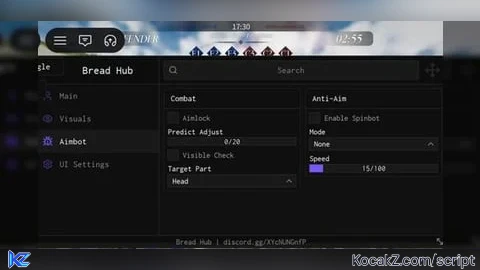
Combat:
Aimlock (Toggle): Automatically locks your camera onto the target.
Predict Adjust (Slider): Adjusts aim offset based on target velocity (Bullet Prediction).
Visible Check (Toggle): Ensures Aimlock only targets players not behind cover.
Team Check (Toggle): Prevents Aimlock from targeting allies.
Target Part (Dropdown): Choose hitboxes (Head, UpperTorso, or HumanoidRootPart).
Anti-Aim / Spinbot:
Enable Spinbot (Toggle): Activates character rotation.
Spin Mode (Dropdown):
None: Disabled.
Spin Bot Walking: Visual rotation that stops when aiming or shooting.
Spin Bot Recon: Forced rotation that continues even with weapons equipped.
Spin Speed (Slider): Adjusts rotation velocity.
FOV Settings:
Show FOV Circle (Toggle): Visualizes the Aimlock's effective radius.
FOV Radius (Slider): Increases or decreases the size of the Aimlock FOV.
⚙️ Tab: UI Settings
Menu Settings:
Menu Toggle (Keybind): Assigns a key to open/hide the GUI (Default: U).
Unload (Button): Completely removes the script and all UI elements.
Configuration & Themes: Save/Load configs and customize the GUI color palette.
#Entrenchred#Aimbot#Universal#Universal aimbot#Keyless


This *s *, don't use it, barely even works
@Dekiru wdym? Tell me more about the problems on it for help me improve the script :D
Excep for the lagging (VERY LAGGING), anything else is good. Pls fix it. *Using Xeno btw
@Royan01 alr, i will fix it, ty for your reply
bruh lag as hell
@Fumo working on it
make aimlock holdable my m2
Fix the script it always aim on far away like an sniper and when there's an enemy close to me the aimbot won't work and it's not even aiming at enemy that is close to me it's only aiming in far away
very good script thank you bro (i use madium executor)
@marwanLOL yw brother