
Lua Script•182 lines (5734 chars)
local YT_LINK = "https://youtu.be/T1-wkgOJWps"
local TT_LINK = "https://vt.tiktok.com/ZS9T2KJ3H/"

local function openURL(url)
    if syn and syn.open_url then
        syn.open_url(url)
    elseif KRNL_openurl then
        KRNL_openurl(url)
    elseif rconsoleprint then
        -- fallback: copy ke clipboard
        setclipboard(url)
        game:GetService("StarterGui"):SetCore("SendNotification", {
            Title = "Link Disalin!",
            Text = "Paste di browser kamu.",
            Duration = 4
        })
        return
    else
        setclipboard(url)
        game:GetService("StarterGui"):SetCore("SendNotification", {
            Title = "Link Disalin!",
            Text = "Paste di browser kamu.",
            Duration = 4
        })
        return
    end
end

local function notify(title, text)
    game:GetService("StarterGui"):SetCore("SendNotification", {
        Title = title,
        Text = text,
        Duration = 3
    })
end

local ScreenGui = Instance.new("ScreenGui")
ScreenGui.Name = "ScriptLinksGUI"
ScreenGui.ResetOnSpawn = false
ScreenGui.ZIndexBehavior = Enum.ZIndexBehavior.Sibling
ScreenGui.Parent = game:GetService("CoreGui")

local MainFrame = Instance.new("Frame")
MainFrame.Name = "MainFrame"
MainFrame.Size = UDim2.new(0, 300, 0, 200)
MainFrame.Position = UDim2.new(0.5, -150, 0.5, -100)
MainFrame.BackgroundColor3 = Color3.fromRGB(18, 18, 18)
MainFrame.BorderSizePixel = 0
MainFrame.Active = true
MainFrame.Draggable = true
MainFrame.Parent = ScreenGui

local MainCorner = Instance.new("UICorner")
MainCorner.CornerRadius = UDim.new(0, 12)
MainCorner.Parent = MainFrame

local MainStroke = Instance.new("UIStroke")
MainStroke.Color = Color3.fromRGB(60, 60, 60)
MainStroke.Thickness = 1
MainStroke.Parent = MainFrame

local TitleBar = Instance.new("Frame")
TitleBar.Name = "TitleBar"
TitleBar.Size = UDim2.new(1, 0, 0, 40)
TitleBar.BackgroundColor3 = Color3.fromRGB(25, 25, 25)
TitleBar.BorderSizePixel = 0
TitleBar.Parent = MainFrame

local TitleCorner = Instance.new("UICorner")
TitleCorner.CornerRadius = UDim.new(0, 12)
TitleCorner.Parent = TitleBar

local TitleFix = Instance.new("Frame")
TitleFix.Size = UDim2.new(1, 0, 0.5, 0)
TitleFix.Position = UDim2.new(0, 0, 0.5, 0)
TitleFix.BackgroundColor3 = Color3.fromRGB(25, 25, 25)
TitleFix.BorderSizePixel = 0
TitleFix.Parent = TitleBar

local TitleLabel = Instance.new("TextLabel")
TitleLabel.Name = "TitleLabel"
TitleLabel.Size = UDim2.new(1, -40, 1, 0)
TitleLabel.Position = UDim2.new(0, 12, 0, 0)
TitleLabel.BackgroundTransparency = 1
TitleLabel.Text = "Script Links"
TitleLabel.TextColor3 = Color3.fromRGB(255, 255, 255)
TitleLabel.TextSize = 15
TitleLabel.Font = Enum.Font.GothamBold
TitleLabel.TextXAlignment = Enum.TextXAlignment.Left
TitleLabel.Parent = TitleBar

local CloseBtn = Instance.new("TextButton")
CloseBtn.Name = "CloseBtn"
CloseBtn.Size = UDim2.new(0, 28, 0, 28)
CloseBtn.Position = UDim2.new(1, -34, 0.5, -14)
CloseBtn.BackgroundColor3 = Color3.fromRGB(200, 50, 50)
CloseBtn.Text = " X "
CloseBtn.TextColor3 = Color3.fromRGB(255, 255, 255)
CloseBtn.TextSize = 13
CloseBtn.Font = Enum.Font.GothamBold
CloseBtn.BorderSizePixel = 0
CloseBtn.Parent = TitleBar

local CloseCorner = Instance.new("UICorner")
CloseCorner.CornerRadius = UDim.new(0, 6)
CloseCorner.Parent = CloseBtn

CloseBtn.MouseButton1Click:Connect(function()
    ScreenGui:Destroy()
end)

local DescLabel = Instance.new("TextLabel")
DescLabel.Name = "DescLabel"
DescLabel.Size = UDim2.new(1, -24, 0, 40)
DescLabel.Position = UDim2.new(0, 12, 0, 48)
DescLabel.BackgroundTransparency = 1
DescLabel.Text = "The script is in the video comments\in one of the links below"
DescLabel.TextColor3 = Color3.fromRGB(180, 180, 180)
DescLabel.TextSize = 12
DescLabel.Font = Enum.Font.Gotham
DescLabel.TextWrapped = true
DescLabel.TextXAlignment = Enum.TextXAlignment.Center
DescLabel.Parent = MainFrame

local YTButton = Instance.new("TextButton")
YTButton.Name = "YouTubeBtn"
YTButton.Size = UDim2.new(1, -24, 0, 44)
YTButton.Position = UDim2.new(0, 12, 0, 98)
YTButton.BackgroundColor3 = Color3.fromRGB(255, 0, 0)
YTButton.Text = "Link YouTube"
YTButton.TextColor3 = Color3.fromRGB(255, 255, 255)
YTButton.TextSize = 14
YTButton.Font = Enum.Font.GothamBold
YTButton.BorderSizePixel = 0
YTButton.Parent = MainFrame

local YTCorner = Instance.new("UICorner")
YTCorner.CornerRadius = UDim.new(0, 8)
YTCorner.Parent = YTButton

YTButton.MouseEnter:Connect(function()
    YTButton.BackgroundColor3 = Color3.fromRGB(200, 0, 0)
end)
YTButton.MouseLeave:Connect(function()
    YTButton.BackgroundColor3 = Color3.fromRGB(255, 0, 0)
end)
YTButton.MouseButton1Click:Connect(function()
    openURL(YT_LINK)
    notify("YouTube", "Membuka link YouTube...")
end)

local TTButton = Instance.new("TextButton")
TTButton.Name = "TikTokBtn"
TTButton.Size = UDim2.new(1, -24, 0, 44)
TTButton.Position = UDim2.new(0, 12, 0, 150)
TTButton.BackgroundColor3 = Color3.fromRGB(0, 0, 0)
TTButton.Text = " Link TikTok"
TTButton.TextColor3 = Color3.fromRGB(255, 255, 255)
TTButton.TextSize = 14
TTButton.Font = Enum.Font.GothamBold
TTButton.BorderSizePixel = 0
TTButton.Parent = MainFrame

local TTCorner = Instance.new("UICorner")
TTCorner.CornerRadius = UDim.new(0, 8)
TTCorner.Parent = TTButton

local TTStroke = Instance.new("UIStroke")
TTStroke.Color = Color3.fromRGB(105, 201, 208) -- warna cyan khas TikTok
TTStroke.Thickness = 1.5
TTStroke.Parent = TTButton

TTButton.MouseEnter:Connect(function()
    TTButton.BackgroundColor3 = Color3.fromRGB(30, 30, 30)
end)
TTButton.MouseLeave:Connect(function()
    TTButton.BackgroundColor3 = Color3.fromRGB(0, 0, 0)
end)
TTButton.MouseButton1Click:Connect(function()
    openURL(TT_LINK)
    notify("TikTok", "Membuka link TikTok...")
end)
Features & Information
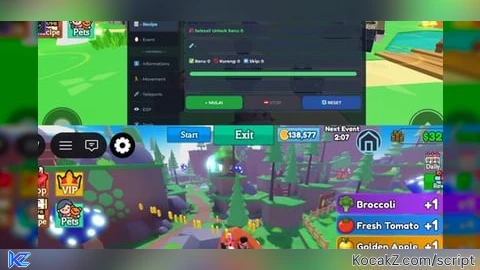
features :
- auto plant crops
- auto spawn animals and fish
- auto harvest crops, animals, fish, trees and mushrooms
- auto recipe (still need cooking ingredients)
- auto join & hit event shyegg
- auto collect item/coin Hinterlands
Review :
https://vt.tiktok.com/ZS9T2KJ3H/
https://youtu.be/T1-wkgOJWps
yess
make it auto recipe
Y*SS PLEASEE
Yesss
Make a script of the new update
sorry guys for the long wait, now I have managed to make some updates which you can read in the latest description.
the reason why I haven't shared the script is because I haven't found a way or cost to protect this script from script copycats.
yes we badly need one 😔🙏🏻
Is there an automatic date scheduling option, or if there's a ready-made automatic tariff scheduling option, could you please share it?
@vvlich Automatic schedule? in the auto farm feature that I created, We plant automatically and will harvest when it's time to harvest, then the system will plant it again, it will repeat until you turn off the feature, this is not a one way feature, this is checking and looping
@vvlich In a game like Cook a Recipe, we don't need auto tariffs because the economy remains the same, no matter when you want to buy, it just depends on the stock amount. maybe i don't understand what you mean
You can see the video review script in the link in the description, I will share it soon
I can't execute it directly. I don't know where did I go wrong.
ฉันต้องการมัน
Any updates? When u release the script udh ga sabar bang
pls bro i need this script
Bang bagi scriptnya pls udah seminggu ga update
Yes plss
Auto collect coin in hinterland is super useful
Any update? When is the release?