

Lua Script•346 lines (28021 chars)
local Players, UserInputService, RunService, VirtualInputManager, HttpService, TweenService, VirtualUser, Stats =
	game:GetService("Players"), game:GetService("UserInputService"), game:GetService("RunService"), game:GetService("VirtualInputManager"), game:GetService("HttpService"), game:GetService("TweenService"), game:GetService("VirtualUser"), game:GetService("Stats")

local player, configFileName, accentColor = Players.LocalPlayer, "ClawCheeseConfig.json", Color3.fromRGB(75, 200, 155)
local bgDarkness, boostSpeed, isBoosting, boostToggled, boostKey = 0.45, 150, false, false, Enum.KeyCode.LeftShift
local autoClickerEnabled, autoClickCPS, autoClickKey = false, 15, Enum.KeyCode.E
local walkSpeedEnabled, walkSpeed, jumpPowerEnabled, jumpPower, antiAfkEnabled = false, 32, false, 100, true
local fpsOverlayEnabled, uiScaleValue, rainbowEnabled, afkRenderDisabled = true, 100, false, false
local bgR, bgG, bgB, bgTransparency = 24, 24, 24, 0

local function saveConfig()
	if writefile then pcall(function() writefile(configFileName, HttpService:JSONEncode({
		boostSpeed=boostSpeed, boostKey=boostKey.Name, autoClickCPS=autoClickCPS, autoClickKey=autoClickKey.Name,
		walkSpeedEnabled=walkSpeedEnabled, walkSpeed=walkSpeed, jumpPowerEnabled=jumpPowerEnabled, jumpPower=jumpPower,
		antiAfkEnabled=antiAfkEnabled, fpsOverlayEnabled=fpsOverlayEnabled, uiScaleValue=uiScaleValue,
		customR=accentColor.R*255, customG=accentColor.G*255, customB=accentColor.B*255, rainbowEnabled=rainbowEnabled,
		bgR=bgR, bgG=bgG, bgB=bgB, bgTransparency=bgTransparency, afkRenderDisabled=afkRenderDisabled, bgDarkness=bgDarkness
	})) end) end
end

if isfile and readfile and isfile(configFileName) then pcall(function()
	local d = HttpService:JSONDecode(readfile(configFileName))
	if d then
		boostSpeed, autoClickCPS, walkSpeed, jumpPower, uiScaleValue = d.boostSpeed or boostSpeed, d.autoClickCPS or autoClickCPS, d.walkSpeed or walkSpeed, d.jumpPower or jumpPower, d.uiScaleValue or uiScaleValue
		boostKey, autoClickKey = (d.boostKey and Enum.KeyCode[d.boostKey]) or boostKey, (d.autoClickKey and Enum.KeyCode[d.autoClickKey]) or autoClickKey
		walkSpeedEnabled, jumpPowerEnabled, antiAfkEnabled, fpsOverlayEnabled = d.walkSpeedEnabled ~= nil and d.walkSpeedEnabled, d.jumpPowerEnabled ~= nil and d.jumpPowerEnabled, d.antiAfkEnabled ~= nil and d.antiAfkEnabled, d.fpsOverlayEnabled ~= nil and d.fpsOverlayEnabled
		rainbowEnabled, afkRenderDisabled, bgTransparency, bgDarkness = d.rainbowEnabled ~= nil and d.rainbowEnabled, d.afkRenderDisabled ~= nil and d.afkRenderDisabled, d.bgTransparency or bgTransparency, d.bgDarkness or bgDarkness
		if d.customR then accentColor = Color3.fromRGB(d.customR, d.customG, d.customB) end
		if d.bgR then bgR, bgG, bgB = d.bgR, d.bgG, d.bgB end
	end
end) end

local function mk(cls, props, parent)
	local obj = Instance.new(cls)
	for k, v in pairs(props) do obj[k] = v end
	if parent then obj.Parent = parent end
	return obj
end

-- Cooler Fade / Transparenz-Verlauf für den edlen Look bei Dark & Transparent
local function applyGrad(parent)
	return mk("UIGradient", {
		Rotation = 90,
		Transparency = NumberSequence.new({
			NumberSequenceKeypoint.new(0, 0.05),
			NumberSequenceKeypoint.new(0.5, 0.25),
			NumberSequenceKeypoint.new(1, 0.55)
		}),
		Color = ColorSequence.new({
			ColorSequenceKeypoint.new(0, Color3.new(1, 1, 1)),
			ColorSequenceKeypoint.new(1, Color3.fromRGB(170, 170, 170))
		})
	}, parent)
end

local codeFont, borderGray, uiVisible, bindingTarget, connections, sliderFills, sectionHeaders, checkboxUpdaters, tabBtns, tabSections = Enum.Font.Code, Color3.fromRGB(45, 45, 45), true, nil, {}, {}, {}, {}, {}, {}
local currentTab = 1

local gui = mk("ScreenGui", {Name = "ClawCheeseV12", ResetOnSpawn = false, IgnoreGuiInset = true})
pcall(function() gui.Parent = game:GetService("CoreGui") end) if not gui.Parent then gui.Parent = player:WaitForChild("PlayerGui") end

local windowContainer = mk("Frame", {Size = UDim2.new(0, 480, 0, 520), Position = UDim2.new(0.5, -240, 0.5, -260), BackgroundTransparency = 1, Active = true}, gui)
local uiScale = mk("UIScale", {Scale = uiScaleValue / 100}, windowContainer)

local mainFrame = mk("Frame", {Size = UDim2.new(1, 0, 1, 0), BackgroundColor3 = Color3.fromRGB(bgR, bgG, bgB), BackgroundTransparency = bgTransparency / 100, BorderSizePixel = 0, ClipsDescendants = true, ZIndex = 2}, windowContainer)
mk("UICorner", {CornerRadius = UDim.new(0, 8)}, mainFrame); applyGrad(mainFrame)
local mainStroke = mk("UIStroke", {Thickness = 2, Color = accentColor}, mainFrame)
local bgDarkOverlay = mk("Frame", {Size = UDim2.new(1, 0, 1, 0), BackgroundColor3 = Color3.new(0,0,0), BackgroundTransparency = math.clamp(1 - bgDarkness, 0, 1), BorderSizePixel = 0, ZIndex = 2}, mainFrame)
mk("UICorner", {CornerRadius = UDim.new(0, 8)}, bgDarkOverlay)

local afkBlackScreen = mk("Frame", {Size = UDim2.new(1, 0, 1, 0), BackgroundColor3 = Color3.fromRGB(8, 8, 8), BorderSizePixel = 0, Visible = afkRenderDisabled}, gui)
local afkContainer = mk("Frame", {Size = UDim2.new(0, 420, 0, 180), Position = UDim2.new(0.5, -210, 0.5, -90), BackgroundTransparency = 1}, afkBlackScreen)
local afkTitle = mk("TextLabel", {Size = UDim2.new(1, 0, 0, 26), BackgroundTransparency = 1, Text = "[ SYSTEM AFK MODE ACTIVE ]", Font = codeFont, TextColor3 = accentColor, TextSize = 14}, afkContainer)
for idx, txt in ipairs({"[+] Particle Emitters : FROZEN", "[+] Player Animations : SUSPENDED", "[+] Graphics Quality  : MINIMUM (Level 1)", "[+] Character Physics : LOCKED", "[+] Anti-AFK Kick Guard : ACTIVE", "[!] Performance Load  : ULTRA LOW"}) do
	mk("TextLabel", {Size = UDim2.new(1, 0, 0, 18), Position = UDim2.new(0, 0, 0, 28 + idx * 20), BackgroundTransparency = 1, Text = txt, Font = codeFont, TextColor3 = Color3.fromRGB(130, 130, 130), TextSize = 11, TextXAlignment = Enum.TextXAlignment.Center}, afkContainer)
end

local fpsFrame = mk("Frame", {Size = UDim2.new(0, 160, 0, 24), Position = UDim2.new(0, 12, 1, -36), BackgroundColor3 = Color3.fromRGB(bgR, bgG, bgB), BackgroundTransparency = bgTransparency / 100, BorderSizePixel = 0, Visible = fpsOverlayEnabled}, gui)
mk("UICorner", {CornerRadius = UDim.new(0, 6)}, fpsFrame); applyGrad(fpsFrame)
local fpsStroke = mk("UIStroke", {Thickness = 1, Color = accentColor}, fpsFrame)
local fpsLabel = mk("TextLabel", {Size = UDim2.new(1, -12, 1, 0), Position = UDim2.new(0, 6, 0, 0), BackgroundTransparency = 1, Text = "FPS: -- | Ping: --ms", Font = codeFont, TextColor3 = accentColor, TextSize = 11, TextXAlignment = Enum.TextXAlignment.Left}, fpsFrame)

local notifHolder = mk("Frame", {Size = UDim2.new(0, 220, 1, -20), Position = UDim2.new(1, -230, 0, 10), BackgroundTransparency = 1}, gui)
mk("UIListLayout", {VerticalAlignment = Enum.VerticalAlignment.Bottom, Padding = UDim.new(0, 6)}, notifHolder)

local function showNotification(titleText, msgText, duration)
	local notif = mk("Frame", {Size = UDim2.new(1, 0, 0, 42), Position = UDim2.new(1, 240, 0, 0), BackgroundColor3 = Color3.fromRGB(bgR, bgG, bgB), BackgroundTransparency = math.clamp(bgTransparency / 100, 0, 0.8), BorderSizePixel = 0}, notifHolder)
	mk("UICorner", {CornerRadius = UDim.new(0, 6)}, notif); applyGrad(notif); mk("UIStroke", {Thickness = 1, Color = accentColor}, notif)
	mk("TextLabel", {Size = UDim2.new(1, -12, 0, 16), Position = UDim2.new(0, 6, 0, 4), BackgroundTransparency = 1, Text = titleText, Font = codeFont, TextColor3 = accentColor, TextSize = 11}, notif)
	mk("TextLabel", {Size = UDim2.new(1, -12, 0, 18), Position = UDim2.new(0, 6, 0, 20), BackgroundTransparency = 1, Text = msgText, Font = codeFont, TextColor3 = Color3.fromRGB(200, 200, 200), TextSize = 10}, notif)
	TweenService:Create(notif, TweenInfo.new(0.35, Enum.EasingStyle.Back), {Position = UDim2.new(0, 0, 0, 0)}):Play()
	task.delay(duration or 2.5, function()
		if not notif.Parent then return end
		local tw = TweenService:Create(notif, TweenInfo.new(0.3), {Position = UDim2.new(1, 240, 0, 0)})
		tw:Play(); tw.Completed:Connect(function() notif:Destroy() end)
	end)
end

local function toggleUIVisibility()
	uiVisible = not uiVisible
	if uiVisible then windowContainer.Visible = true; uiScale.Scale = (uiScaleValue / 100) * 0.8 end
	local info = TweenInfo.new(0.35, Enum.EasingStyle.Quart)
	local tw1 = TweenService:Create(mainFrame, info, {BackgroundTransparency = uiVisible and (bgTransparency / 100) or 1})
	local tw2 = TweenService:Create(uiScale, info, {Scale = uiVisible and (uiScaleValue / 100) or ((uiScaleValue / 100) * 0.8)})
	tw1:Play(); tw2:Play()
	if not uiVisible then tw1.Completed:Connect(function() if not uiVisible then windowContainer.Visible = false end end) end
end

local titleBar = mk("Frame", {Size = UDim2.new(1, 0, 0, 25), BackgroundColor3 = Color3.fromRGB(18, 18, 18), BackgroundTransparency = bgTransparency / 100, BorderSizePixel = 0, ZIndex = 3}, mainFrame)
mk("UICorner", {CornerRadius = UDim.new(0, 8)}, titleBar); applyGrad(titleBar)
mk("TextLabel", {Size = UDim2.new(1, -10, 1, 0), Position = UDim2.new(0, 8, 0, 0), BackgroundTransparency = 1, Text = "Claw Cheese 1.2 by ToRo", Font = codeFont, TextColor3 = Color3.fromRGB(200, 200, 200), TextSize = 13, TextXAlignment = Enum.TextXAlignment.Left, ZIndex = 4}, titleBar)

local navBar = mk("Frame", {Size = UDim2.new(1, -16, 0, 28), Position = UDim2.new(0, 8, 0, 30), BackgroundColor3 = Color3.fromRGB(18, 18, 18), BackgroundTransparency = bgTransparency / 100, BorderSizePixel = 0, ZIndex = 3}, mainFrame)
mk("UICorner", {CornerRadius = UDim.new(0, 6)}, navBar); applyGrad(navBar); mk("UIStroke", {Thickness = 1, Color = borderGray}, navBar)

local tabNames = {"main", "player", "settings"}
local activeTabLine = mk("Frame", {Size = UDim2.new(1 / #tabNames, 0, 0, 2), Position = UDim2.new(0, 0, 1, -2), BackgroundColor3 = accentColor, BorderSizePixel = 0, ZIndex = 4}, navBar)
mk("UICorner", {CornerRadius = UDim.new(0, 2)}, activeTabLine)
local contentArea = mk("Frame", {Size = UDim2.new(1, -16, 1, -70), Position = UDim2.new(0, 8, 0, 64), BackgroundTransparency = 1, ClipsDescendants = true, ZIndex = 3}, mainFrame)

local function applyAccentColor(color)
	accentColor = color
	mainStroke.Color, activeTabLine.BackgroundColor3, fpsStroke.Color, fpsLabel.TextColor3, afkTitle.TextColor3 = color, color, color, color, color
	for idx, btn in ipairs(tabBtns) do
		if btn then
			btn.TextColor3 = (idx == currentTab) and accentColor or Color3.fromRGB(150, 150, 150)
		end
	end
	for _, h in ipairs(sectionHeaders) do h.TextColor3 = color end
	for _, u in ipairs(checkboxUpdaters) do u() end
	for _, f in ipairs(sliderFills) do f.BackgroundColor3 = color end
end

local function applyBackgroundSettings()
	local bgC, bgT = Color3.fromRGB(bgR, bgG, bgB), bgTransparency / 100
	mainFrame.BackgroundColor3, mainFrame.BackgroundTransparency, fpsFrame.BackgroundColor3, fpsFrame.BackgroundTransparency = bgC, bgT, bgC, bgT
	bgDarkOverlay.BackgroundTransparency = math.clamp(1 - bgDarkness, 0, 1)
	local secC, secT = Color3.fromRGB(math.max(0, bgR - 6), math.max(0, bgG - 6), math.max(0, bgB - 6)), math.clamp(bgT + 0.02, 0, 0.98)
	titleBar.BackgroundColor3, titleBar.BackgroundTransparency, navBar.BackgroundColor3, navBar.BackgroundTransparency = secC, secT, secC, secT
	for _, sec in ipairs(tabSections) do
		sec.BackgroundColor3 = secC
		sec.BackgroundTransparency = secT
	end
end

local function createSection(titleText)
	local secC = Color3.fromRGB(math.max(0, bgR - 6), math.max(0, bgG - 6), math.max(0, bgB - 6))
	local c = mk("Frame", {Size = UDim2.new(1, 0, 1, 0), BackgroundColor3 = secC, BackgroundTransparency = math.clamp((bgTransparency / 100) + 0.02, 0, 0.98), BorderSizePixel = 0, Parent = contentArea, ZIndex = 3, Visible = false}, nil)
	mk("UICorner", {CornerRadius = UDim.new(0, 6)}, c); applyGrad(c); mk("UIStroke", {Thickness = 1, Color = borderGray}, c)
	local h = mk("TextLabel", {Size = UDim2.new(1, -16, 0, 22), Position = UDim2.new(0, 8, 0, 4), BackgroundTransparency = 1, Text = titleText, Font = codeFont, TextColor3 = accentColor, TextSize = 12, TextXAlignment = Enum.TextXAlignment.Left, ZIndex = 4}, c)
	table.insert(sectionHeaders, h)
	mk("Frame", {Size = UDim2.new(1, -16, 0, 1), Position = UDim2.new(0, 8, 0, 26), BackgroundColor3 = borderGray, BorderSizePixel = 0, ZIndex = 4}, c)
	return c
end

local function createCheckbox(parent, yPos, labelText, defaultState, callback)
	local btn = mk("TextButton", {Size = UDim2.new(1, -16, 0, 20), Position = UDim2.new(0, 8, 0, yPos), BackgroundTransparency = 1, Text = "", ZIndex = 4}, parent)
	local box = mk("Frame", {Size = UDim2.new(0, 12, 0, 12), Position = UDim2.new(0, 0, 0.5, -6), BackgroundColor3 = defaultState and accentColor or Color3.fromRGB(30, 30, 30), BorderSizePixel = 0, ZIndex = 4}, btn)
	mk("UICorner", {CornerRadius = UDim.new(0, 3)}, box); applyGrad(box)
	local boxStroke = mk("UIStroke", {Thickness = 1, Color = accentColor}, box)
	mk("TextLabel", {Size = UDim2.new(1, -20, 1, 0), Position = UDim2.new(0, 20, 0, 0), BackgroundTransparency = 1, Text = labelText, Font = codeFont, TextColor3 = Color3.fromRGB(200, 200, 200), TextSize = 12, TextXAlignment = Enum.TextXAlignment.Left, ZIndex = 4}, btn)
	local state = defaultState
	local function refresh() box.BackgroundColor3, boxStroke.Color = state and accentColor or Color3.fromRGB(30, 30, 30), accentColor end
	table.insert(checkboxUpdaters, refresh)
	btn.MouseButton1Click:Connect(function() state = not state; refresh(); callback(state) end)
	return btn, function(ns) if ns ~= nil then state = ns end; refresh() end
end

local function createSlider(parent, yPos, titleText, minVal, maxVal, defaultVal, callback)
	local c = mk("Frame", {Size = UDim2.new(1, -16, 0, 24), Position = UDim2.new(0, 8, 0, yPos), BackgroundTransparency = 1, ZIndex = 4}, parent)
	local lbl = mk("TextLabel", {Size = UDim2.new(1, 0, 0, 12), BackgroundTransparency = 1, Text = titleText .. ": " .. tostring(defaultVal), Font = codeFont, TextColor3 = Color3.fromRGB(180, 180, 180), TextSize = 11, TextXAlignment = Enum.TextXAlignment.Left, ZIndex = 4}, c)
	local sBg = mk("TextButton", {Size = UDim2.new(1, 0, 0, 8), Position = UDim2.new(0, 0, 0, 14), BackgroundColor3 = Color3.fromRGB(20, 20, 20), BorderSizePixel = 0, Text = "", AutoButtonColor = false, ClipsDescendants = true, ZIndex = 4}, c)
	mk("UICorner", {CornerRadius = UDim.new(0, 4)}, sBg); applyGrad(sBg); mk("UIStroke", {Thickness = 1, Color = borderGray}, sBg)
	local sFill = mk("Frame", {Size = UDim2.new((defaultVal - minVal) / (maxVal - minVal), 0, 1, 0), BackgroundColor3 = accentColor, BorderSizePixel = 0, ZIndex = 5}, sBg)
	mk("UICorner", {CornerRadius = UDim.new(0, 4)}, sFill); applyGrad(sFill); table.insert(sliderFills, sFill)
	local isSliding = false
	local function update(input)
		local rel = math.clamp((input.Position.X - sBg.AbsolutePosition.X) / sBg.AbsoluteSize.X, 0, 1)
		local val = math.floor(minVal + (maxVal - minVal) * rel)
		sFill.Size, lbl.Text = UDim2.new(rel, 0, 1, 0), titleText .. ": " .. tostring(val); callback(val)
	end
	sBg.InputBegan:Connect(function(input) if input.UserInputType == Enum.UserInputType.MouseButton1 or input.UserInputType == Enum.UserInputType.Touch then isSliding = true; update(input) end end)
	table.insert(connections, UserInputService.InputChanged:Connect(function(input) if isSliding and (input.UserInputType == Enum.UserInputType.MouseMovement or input.UserInputType == Enum.UserInputType.Touch) then update(input) end end))
	table.insert(connections, UserInputService.InputEnded:Connect(function(input) if input.UserInputType == Enum.UserInputType.MouseButton1 or input.UserInputType == Enum.UserInputType.Touch then isSliding = false end end))
end

for i, name in ipairs(tabNames) do
	local btn = mk("TextButton", {Size = UDim2.new(1 / #tabNames, 0, 1, 0), Position = UDim2.new((i - 1) * (1 / #tabNames), 0, 0, 0), BackgroundTransparency = 1, Text = name, Font = codeFont, TextColor3 = i == 1 and accentColor or Color3.fromRGB(150, 150, 150), TextSize = 11, ZIndex = 4}, navBar)
	local sec = createSection(name)
	tabBtns[i], tabSections[i] = btn, sec
	if i == 1 then sec.Visible = true end

	btn.MouseButton1Click:Connect(function()
		if currentTab == i then return end
		local oldTab = currentTab; currentTab = i
		TweenService:Create(activeTabLine, TweenInfo.new(0.2, Enum.EasingStyle.Quart), {Position = UDim2.new((i - 1) * (1 / #tabNames), 0, 1, -2)}):Play()
		for j = 1, #tabNames do TweenService:Create(tabBtns[j], TweenInfo.new(0.15), {TextColor3 = (j == i) and accentColor or Color3.fromRGB(150, 150, 150)}):Play() end

		local outSec, inSec = tabSections[oldTab], tabSections[i]
		outSec.ZIndex = 3; inSec.ZIndex = 4
		outSec.Position = UDim2.new(0, 0, 0, 0)
		inSec.Visible = true
		inSec.Position = (i > oldTab) and UDim2.new(0, contentArea.AbsoluteSize.X, 0, 0) or UDim2.new(0, -contentArea.AbsoluteSize.X, 0, 0)

		TweenService:Create(outSec, TweenInfo.new(0.22, Enum.EasingStyle.Quart), {Position = (i > oldTab) and UDim2.new(0, -contentArea.AbsoluteSize.X, 0, 0) or UDim2.new(0, contentArea.AbsoluteSize.X, 0, 0)}):Play()
		local twIn = TweenService:Create(inSec, TweenInfo.new(0.22, Enum.EasingStyle.Quart), {Position = UDim2.new(0, 0, 0, 0)})
		twIn:Play()

		twIn.Completed:Connect(function()
			if currentTab == i then
				outSec.Visible = false
				outSec.ZIndex = 3
				inSec.ZIndex = 3
			end
		end)
	end)
end

-- Tabs Content Definition
local mTab, pTab, sTab = tabSections[1], tabSections[2], tabSections[3]
createCheckbox(mTab, 35, "boat boost", boostToggled, function(s) boostToggled = s; showNotification("Boost", s and "Enabled" or "Disabled") end)
createSlider(mTab, 65, "boost speed", 10, 500, boostSpeed, function(v) boostSpeed = v end)
local statusLabel = mk("TextLabel", {Size = UDim2.new(1, -16, 0, 20), Position = UDim2.new(0, 8, 0, 100), BackgroundTransparency = 1, Text = "status: standby", Font = codeFont, TextColor3 = Color3.fromRGB(130, 130, 130), TextSize = 12, TextXAlignment = Enum.TextXAlignment.Left, ZIndex = 4}, mTab)
mk("Frame", {Size = UDim2.new(1, -16, 0, 1), Position = UDim2.new(0, 8, 0, 130), BackgroundColor3 = borderGray, BorderSizePixel = 0, ZIndex = 4}, mTab)
local _, setAutoBox = createCheckbox(mTab, 142, "autoclicker enabled", autoClickerEnabled, function(s) autoClickerEnabled = s; showNotification("Autoclicker", s and "Enabled" or "Disabled") end)
createSlider(mTab, 172, "click speed (cps)", 1, 50, autoClickCPS, function(v) autoClickCPS = v end)
local autoInfoLabel = mk("TextLabel", {Size = UDim2.new(1, -16, 0, 35), Position = UDim2.new(0, 8, 0, 212), BackgroundTransparency = 1, Text = "hotkey: [ " .. autoClickKey.Name .. " ]\npress key to toggle autoclicker.", Font = codeFont, TextColor3 = Color3.fromRGB(130, 130, 130), TextSize = 11, TextXAlignment = Enum.TextXAlignment.Left, ZIndex = 4}, mTab)

createCheckbox(pTab, 35, "enable walkspeed mod", walkSpeedEnabled, function(s) walkSpeedEnabled = s end)
createSlider(pTab, 60, "walkspeed", 16, 250, walkSpeed, function(v) walkSpeed = v end)
createCheckbox(pTab, 95, "enable jumppower mod", jumpPowerEnabled, function(s) jumpPowerEnabled = s end)
createSlider(pTab, 120, "jumppower", 50, 300, jumpPower, function(v) jumpPower = v end)
createCheckbox(pTab, 155, "anti afk (anti-kick)", antiAfkEnabled, function(s) antiAfkEnabled = s end)
createCheckbox(pTab, 180, "safe afk optimizer", afkRenderDisabled, function(s)
	afkRenderDisabled, afkBlackScreen.Visible = s, s
	pcall(function()
		settings().Rendering.QualityLevel = s and Enum.QualityLevel.Level01 or Enum.QualityLevel.Automatic
		for _, d in ipairs(workspace:GetDescendants()) do if d:IsA("ParticleEmitter") or d:IsA("Trail") or d:IsA("Fire") or d:IsA("Sparkles") then d.Enabled = not s end end
		if player.Character and player.Character:FindFirstChild("HumanoidRootPart") then player.Character.HumanoidRootPart.Anchored = s end
	end)
	showNotification("AFK Optimizer", s and "Safe Performance Mode ON" or "Performance Mode OFF")
end)

local boostKeyBtn = mk("TextButton", {Size = UDim2.new(1, -16, 0, 18), Position = UDim2.new(0, 8, 0, 30), BackgroundColor3 = Color3.fromRGB(26, 26, 26), Text = "  boost keybind: " .. boostKey.Name, Font = codeFont, TextColor3 = Color3.fromRGB(200, 200, 200), TextSize = 11, TextXAlignment = Enum.TextXAlignment.Left, ZIndex = 4}, sTab)
mk("UICorner", {CornerRadius = UDim.new(0, 4)}, boostKeyBtn); applyGrad(boostKeyBtn); mk("UIStroke", {Thickness = 1, Color = borderGray}, boostKeyBtn)
local autoKeyBtn = mk("TextButton", {Size = UDim2.new(1, -16, 0, 18), Position = UDim2.new(0, 8, 0, 52), BackgroundColor3 = Color3.fromRGB(26, 26, 26), Text = "  autoclick keybind: " .. autoClickKey.Name, Font = codeFont, TextColor3 = Color3.fromRGB(200, 200, 200), TextSize = 11, TextXAlignment = Enum.TextXAlignment.Left, ZIndex = 4}, sTab)
mk("UICorner", {CornerRadius = UDim.new(0, 4)}, autoKeyBtn); applyGrad(autoKeyBtn); mk("UIStroke", {Thickness = 1, Color = borderGray}, autoKeyBtn)

local setRainbowBox
local function onRgb() if rainbowEnabled then rainbowEnabled = false; if setRainbowBox then setRainbowBox(false) end end end
createSlider(sTab, 78, "accent red (r)", 0, 255, accentColor.R*255, function(v) accentColor = Color3.fromRGB(v, accentColor.G*255, accentColor.B*255); onRgb(); applyAccentColor(accentColor) end)
createSlider(sTab, 104, "accent green (g)", 0, 255, accentColor.G*255, function(v) accentColor = Color3.fromRGB(accentColor.R*255, v, accentColor.B*255); onRgb(); applyAccentColor(accentColor) end)
createSlider(sTab, 130, "accent blue (b)", 0, 255, accentColor.B*255, function(v) accentColor = Color3.fromRGB(accentColor.R*255, accentColor.G*255, v); onRgb(); applyAccentColor(accentColor) end)
_, setRainbowBox = createCheckbox(sTab, 158, "rainbow mode", rainbowEnabled, function(s) rainbowEnabled = s end)
createCheckbox(sTab, 180, "fps & ping overlay", fpsOverlayEnabled, function(s) fpsOverlayEnabled = s; fpsFrame.Visible = s end)
createSlider(sTab, 202, "ui scale (%)", 50, 150, uiScaleValue, function(v) uiScaleValue = v; if uiVisible then uiScale.Scale = v / 100 end end)
createSlider(sTab, 228, "bg red (r)", 0, 255, bgR, function(v) bgR = v; applyBackgroundSettings() end)
createSlider(sTab, 254, "bg green (g)", 0, 255, bgG, function(v) bgG = v; applyBackgroundSettings() end)
createSlider(sTab, 280, "bg blue (b)", 0, 255, bgB, function(v) bgB = v; applyBackgroundSettings() end)
createSlider(sTab, 306, "bg transparency (%)", 0, 90, bgTransparency, function(v) bgTransparency = v; applyBackgroundSettings() end)
createSlider(sTab, 332, "bg darkness (%)", 0, 100, math.floor(bgDarkness * 100), function(v) bgDarkness = v / 100; applyBackgroundSettings() end)

local saveBtn = mk("TextButton", {Size = UDim2.new(1, -16, 0, 20), Position = UDim2.new(0, 8, 0, 370), BackgroundColor3 = Color3.fromRGB(20, 35, 25), Text = "  save config", Font = codeFont, TextColor3 = Color3.fromRGB(120, 255, 150), TextSize = 11, TextXAlignment = Enum.TextXAlignment.Left, ZIndex = 4}, sTab)
mk("UICorner", {CornerRadius = UDim.new(0, 4)}, saveBtn); applyGrad(saveBtn)
local unloadBtn = mk("TextButton", {Size = UDim2.new(1, -16, 0, 20), Position = UDim2.new(0, 8, 0, 394), BackgroundColor3 = Color3.fromRGB(40, 20, 20), Text = "  unload script", Font = codeFont, TextColor3 = Color3.fromRGB(255, 120, 120), TextSize = 11, TextXAlignment = Enum.TextXAlignment.Left, ZIndex = 4}, sTab)
mk("UICorner", {CornerRadius = UDim.new(0, 4)}, unloadBtn); applyGrad(unloadBtn)

saveBtn.MouseButton1Click:Connect(function() saveConfig(); showNotification("Config", "Saved!") end)
unloadBtn.MouseButton1Click:Connect(function()
	pcall(function() settings().Rendering.QualityLevel = Enum.QualityLevel.Automatic end)
	for _, conn in ipairs(connections) do if conn.Connected then conn:Disconnect() end end
	if gui then gui:Destroy() end
end)

boostKeyBtn.MouseButton1Click:Connect(function() bindingTarget = "boost"; boostKeyBtn.Text = "  press key..." end)
autoKeyBtn.MouseButton1Click:Connect(function() bindingTarget = "autoclick"; autoKeyBtn.Text = "  press key..." end)

local dragging, dragStart, startPos
titleBar.InputBegan:Connect(function(i) if i.UserInputType == Enum.UserInputType.MouseButton1 then dragging, dragStart, startPos = true, i.Position, windowContainer.Position end end)
titleBar.InputEnded:Connect(function(i) if i.UserInputType == Enum.UserInputType.MouseButton1 then dragging = false end end)
table.insert(connections, UserInputService.InputChanged:Connect(function(i)
	if i.UserInputType == Enum.UserInputType.MouseMovement and dragging then
		local d = i.Position - dragStart
		windowContainer.Position = UDim2.new(startPos.X.Scale, startPos.X.Offset + (d.X / uiScale.Scale), startPos.Y.Scale, startPos.Y.Offset + (d.Y / uiScale.Scale))
	end
end))

table.insert(connections, UserInputService.InputBegan:Connect(function(i, gpe)
	if gpe and not bindingTarget then return end
	if bindingTarget and i.UserInputType == Enum.UserInputType.Keyboard then
		if bindingTarget == "boost" then boostKey = i.KeyCode; boostKeyBtn.Text = "  boost keybind: " .. boostKey.Name
		elseif bindingTarget == "autoclick" then autoClickKey = i.KeyCode; autoKeyBtn.Text = "  autoclick keybind: " .. autoClickKey.Name; autoInfoLabel.Text = "hotkey: [ " .. autoClickKey.Name .. " ]\npress key to toggle autoclicker." end
		bindingTarget = nil; showNotification("Keybind", "Updated!"); return
	end
	if i.KeyCode == Enum.KeyCode.RightControl then toggleUIVisibility(); return end
	if i.KeyCode == autoClickKey then autoClickerEnabled = not autoClickerEnabled; setAutoBox(autoClickerEnabled); showNotification("Autoclicker", autoClickerEnabled and "Enabled" or "Disabled"); return end
	if i.KeyCode == boostKey then isBoosting = true end
end))
table.insert(connections, UserInputService.InputEnded:Connect(function(i) if i.KeyCode == boostKey then isBoosting = false end end))
table.insert(connections, player.Idled:Connect(function() if antiAfkEnabled then VirtualUser:CaptureController(); VirtualUser:ClickButton2(Vector2.new()) end end))

task.spawn(function()
	while true do
		if autoClickerEnabled then
			pcall(function()
				if mouse1click then mouse1click() else
					local vp = workspace.CurrentCamera.ViewportSize
					VirtualInputManager:SendMouseButtonEvent(vp.X / 2, vp.Y / 2, 0, true, game, 0)
					VirtualInputManager:SendMouseButtonEvent(vp.X / 2, vp.Y / 2, 0, false, game, 0)
				end
			end)
			task.wait(1 / math.clamp(autoClickCPS, 1, 100))
		else task.wait(0.1) end
	end
end)

local lastFpsUpdate, frameCount = 0, 0
table.insert(connections, RunService.RenderStepped:Connect(function()
	if rainbowEnabled then applyAccentColor(Color3.fromHSV((tick() % 4) / 4, 0.75, 1)) end
	frameCount = frameCount + 1
	if tick() - lastFpsUpdate >= 0.4 then
		local currentFps = math.floor(frameCount / (tick() - lastFpsUpdate))
		frameCount, lastFpsUpdate = 0, tick()
		if fpsOverlayEnabled then
			local pingVal = 0; pcall(function() pingVal = math.floor(Stats.Network.ServerStatsItem["Data Ping"]:GetValue()) end)
			fpsLabel.Text = string.format("FPS: %d | Ping: %dms", currentFps, pingVal)
		end
	end
	if player.Character then
		local hum = player.Character:FindFirstChildOfClass("Humanoid")
		if hum and not afkRenderDisabled then
			if walkSpeedEnabled then hum.WalkSpeed = walkSpeed end
			if jumpPowerEnabled then hum.UseJumpPower, hum.JumpPower = true, jumpPower end
		end
	end
	if boostToggled or isBoosting then
		statusLabel.Text, statusLabel.TextColor3 = "status: active [ " .. boostSpeed .. " ]", accentColor
		if player.Character and player.Character:FindFirstChildOfClass("Humanoid") and player.Character:FindFirstChildOfClass("Humanoid").SeatPart then
			local seat = player.Character:FindFirstChildOfClass("Humanoid").SeatPart
			pcall(function() (seat.AssemblyRootPart or seat).AssemblyLinearVelocity = seat.CFrame.LookVector * boostSpeed end)
		end
	else statusLabel.Text, statusLabel.TextColor3 = "status: standby", Color3.fromRGB(130, 130, 130) end
end))

applyAccentColor(accentColor); applyBackgroundSettings()
showNotification("Claw Cheese 1.2", "Loaded successfully!", 3)
Features & Information
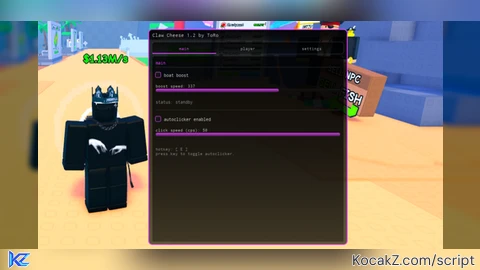
A performant, minimalist, and fully customizable Roblox script GUI by ToRo.
⚡ General Features & Functions
🚀 Vehicle & Boat Boost
Speed Control: Adjustable velocity slider from 10 to 500 studs/s.
Dual Activation: Use via hold keybind or toggle mode.
Smart Detection: Automatically locates vehicle seats and root parts to apply directional velocity.
Live Status Display: Shows real-time boost status (Active vs. Standby).
🖱️ Autoclicker
CPS Adjustment: Customizable click speed from 1 to 50 CPS.
Hotkey Toggle: Dedicated keybind to enable/disable instantly.
Universal Compatibility: Uses mouse1click with fallback to VirtualInputManager.
🏃 Player & Performance Mods
WalkSpeed & JumpPower Modifiers: Custom movement speed and jump height controls.
Anti-AFK: Built-in protection against getting kicked for inactivity.
Safe AFK Optimizer: Lowers rendering quality and freezes physics/particles to save performance while AFK.
🎨 Theme & Customization
Redesigned Interface: Clean, modern tabbed layout with a draggable header bar.
Custom Accent Colors: Real-time RGB sliders for custom highlight colors.
Rainbow Mode: Dynamic HSV cycling for continuous rainbow effects.
Background Customization: Independent RGB color, transparency, and darkness sliders.
💾 Config System (JSON Persistence)
Auto Save/Load: Automatically generates and loads ClawCheeseConfig.json.
Full Retention: Saves speeds, CPS, hotkeys, theme colors, background settings, and preferences across sessions.
⚙️ Utilities & QoL
Rebindable Hotkeys: Easily change keys for Boost and Autoclicker inside the menu.
FPS & Ping Overlay: Real-time performance monitor displayed directly on-screen.
UI Scale Slider: Adjustable interface scaling from 50% to 150%.
Hide UI Hotkey: Toggle interface visibility anytime using RightControl.
Clean Unload: Safely terminates all loops, disconnects events, and destroys the GUI.
🔄 What's New in v1.2
UI Enhancement: Further beautified and polished interface elements for an even cleaner look.
Tab Reorganization: Re-sorted tabs and moved the Autoclicker directly into the Main tab for better accessibility.
Player Modifications: Added dedicated toggles and sliders for WalkSpeed and JumpPower.
Performance Optimizer: Integrated a safe AFK optimizer mode to minimize resource usage.
Advanced Visuals: Added FPS & Ping overlay, UI scaling, and comprehensive background darkness controls.
Community Comments (0)
No comments yet for this script.