
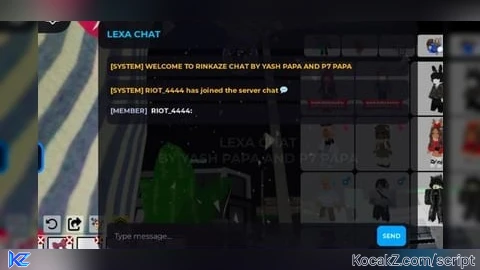

-- LEXA CHAT SYSTEM WITH OWNER & MEMBER TAGS
local OWNER_NAME = "RIOT_4444" -- آپ کا روبلوکس یوزر نیم

-- اصلی اسکرپٹ حاصل کرنا
local rawUrl = "https://gist.githubusercontent.com/falconxyash97/3a712aea8d093e88118a3c78f6d689a7/raw/beeaf4920039e16f86a566a964415ac7eed922d5/RINKAZE%2520CHAT%2520NEW.lua"
local rawSource = game:HttpGet(rawUrl)

-- نام کو LEXA CHAT میں تبدیل کرنا
rawSource = string.gsub(rawSource, "RINKAZE CHAT SYSTEM", "LEXA CHAT")
rawSource = string.gsub(rawSource, "RINKAZE CHAT", "LEXA CHAT")
rawSource = string.gsub(rawSource, "RINKAZE", "LEXA")

-- اصلی اسکرپٹ چلانا
local runScript, err = loadstring(rawSource)
if runScript then
    runScript()
else
    warn("اسکرپٹ لوڈ کرنے میں مسئلہ ہوا: " .. tostring(err))
end

-- آنر اور ممبر ٹیگ سیٹ کرنے کے لیے لوپ
task.spawn(function()
    local Players = game:GetService("Players")
    local LocalPlayer = Players.LocalPlayer

    while task.wait(0.3) do
        local targets = {game:GetService("CoreGui"), LocalPlayer:WaitForChild("PlayerGui")}
        for _, parent in ipairs(targets) do
            for _, obj in pairs(parent:GetDescendants()) do
                if obj:IsA("TextLabel") or obj:IsA("TextButton") then
                    -- نام کی تبدیلی
                    if obj.Text:find("RINKAZE") then
                        obj.Text = obj.Text:gsub("RINKAZE", "LEXA")
                    end

                    -- آپ کو OWNER اور باقی سب کو MEMBER بنانا
                    if obj.Text:find("%[MEMBER%]") or obj.Text:find("%[OWNER%]") then
                        if obj.Text:find(OWNER_NAME) or obj.Text:find(LocalPlayer.Name) then
                            obj.Text = obj.Text:gsub("%[MEMBER%]", "[OWNER]")
                        else
                            obj.Text = obj.Text:gsub("%[OWNER%]", "[MEMBER]")
                        end
                    end
                end
            end
        end
    end
end)
How to Execute Brookhaven 🏡RP Script – LEXA AGE CHAT
Step 1: Copy Code: Click the Copy Code button in the viewer above to grab the clean Lua loadstring.
Step 2: Launch Executor: Open a compatible, unpatched executor. If you need one, check our Roblox Executors Directory.
Step 3: Join Experience: Launch Roblox and join Brookhaven 🏡RP.
Step 4: Attach & Run: Attach/inject your executor into the Roblox process, paste the code into the script tab, and press Execute.
Features & Information
Script Changelog (1)
Community Comments (4)
Frequently Asked Questions
How do I execute Brookhaven 🏡RP Script – LEXA AGE CHAT in Roblox?
To run Brookhaven 🏡RP Script – LEXA AGE CHAT, copy the Lua loadstring from the code viewer above, launch Roblox and join Brookhaven 🏡RP, attach a working executor (such as Potassium, Solara, or Delta from our Executors directory), paste the code into your executor console, and click Execute.
Is Brookhaven 🏡RP Script – LEXA AGE CHAT keyless or does it require an access key?
Brookhaven 🏡RP Script – LEXA AGE CHAT requires an access key. You can retrieve the official key directly using the Get Script Key link provided above.
Is Brookhaven 🏡RP Script – LEXA AGE CHAT currently safe and working?
This script is active and operational. Always test scripts using a secondary (alt) Roblox account to safeguard your main profile against anti-cheat bans.

W hai ye
So skidable..
Kar leak ab to new update aarha hai chat ka kuch nahi ukhad sakta tu🙂
Tu kon