
![Item Spawner - Bypass Gamepass [OPEN-SOURCE]](https://cdn.kocakz.me/images/a4a9dc53d5071a447621497e6649bc08d7868008c85e0c21ce3e70efcff4ed40.webp)
Key Required
local player = game.Players.LocalPlayer
local character = player.Character or player.CharacterAdded:Wait()
local humanoid = character:WaitForChild("Humanoid")

local gui = Instance.new("ScreenGui", player:WaitForChild("PlayerGui"))
gui.Name = "ToggleGUI"
gui.ResetOnSpawn = false

local frame = Instance.new("Frame", gui)
frame.Size = UDim2.new(0, 270, 0, 230)
frame.Position = UDim2.new(0.5, -135, 0.5, -115)
frame.BackgroundColor3 = Color3.fromRGB(30, 30, 30)
frame.BorderSizePixel = 0
frame.Active = true
frame.Draggable = true

local uipadding = Instance.new("UIPadding", frame)
uipadding.PaddingTop = UDim.new(0, 0)
uipadding.PaddingLeft = UDim.new(0, 10)
uipadding.PaddingRight = UDim.new(0, 10)
uipadding.PaddingBottom = UDim.new(0, 10)

local title = Instance.new("TextLabel", frame)
title.Size = UDim2.new(1, -40, 0, 25)
title.Position = UDim2.new(0, 0, 0, 0)
title.BackgroundTransparency = 1
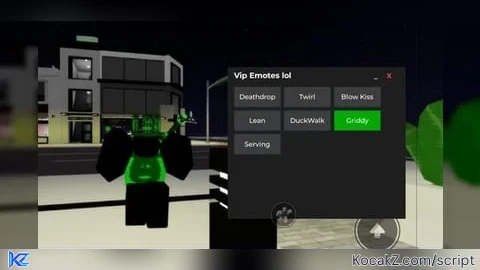
title.Text = "Vip Emotes lol"
title.TextColor3 = Color3.new(1,1,1)
title.TextXAlignment = Enum.TextXAlignment.Left
title.Font = Enum.Font.GothamBold
title.TextSize = 14

local closeBtn = Instance.new("TextButton", frame)
closeBtn.Size = UDim2.new(0, 20, 0, 20)
closeBtn.Position = UDim2.new(1, -25, 0, 3)
closeBtn.Text = "X"
closeBtn.Font = Enum.Font.GothamBold
closeBtn.TextColor3 = Color3.new(1, 0.3, 0.3)
closeBtn.TextSize = 12
closeBtn.BackgroundTransparency = 1

local minimizeBtn = Instance.new("TextButton", frame)
minimizeBtn.Size = UDim2.new(0, 20, 0, 20)
minimizeBtn.Position = UDim2.new(1, -45, 0, 3)
minimizeBtn.Text = "_"
minimizeBtn.Font = Enum.Font.GothamBold
minimizeBtn.TextColor3 = Color3.new(0.7, 0.7, 1)
minimizeBtn.TextSize = 14
minimizeBtn.BackgroundTransparency = 1

local scroll = Instance.new("ScrollingFrame", frame)
scroll.Size = UDim2.new(1, 0, 1, -35)
scroll.Position = UDim2.new(0, 0, 0, 30)
scroll.CanvasSize = UDim2.new(0, 0, 0, 0)
scroll.BackgroundTransparency = 1
scroll.ScrollBarThickness = 4

local layout = Instance.new("UIGridLayout", scroll)
layout.CellSize = UDim2.new(0, 70, 0, 30)
layout.CellPadding = UDim2.new(0, 6, 0, 6)
layout.SortOrder = Enum.SortOrder.LayoutOrder
layout.FillDirectionMaxCells = 3
layout.FillDirection = Enum.FillDirection.Horizontal

local toggles = {}
local currentActive = nil
local currentTrack = nil

local animations = {
	Lean = 114442287404310,
	["Blow Kiss"] = 108798393262707,
	Twirl = 111154065550513,
	Griddy = 94090358186461,
	Serving = 82247407333647,
	DuckWalk = 136836683270489,
	Deathdrop = 124584784356176,
}

local playAnimation = function(id)
	local animation = Instance.new("Animation")
	animation.AnimationId = "rbxassetid://" .. id
	local track = humanoid:LoadAnimation(animation)
	track.Looped = true
	track:Play()
	return track
end

local setActiveToggle = function(toggle, animId)
	for _, b in ipairs(toggles) do
		b.BackgroundColor3 = Color3.fromRGB(60, 60, 60)
	end
	if currentTrack then
		currentTrack:Stop()
		currentTrack:Destroy()
		currentTrack = nil
	end
	if toggle then
		toggle.BackgroundColor3 = Color3.fromRGB(0, 170, 0)
		currentTrack = playAnimation(animId)
		currentActive = toggle
	else
		currentActive = nil
	end
end

local createToggle = function(name, layoutOrder, animId)
	local button = Instance.new("TextButton")
	button.Size = UDim2.new(0, 70, 0, 30)
	button.BackgroundColor3 = Color3.fromRGB(60, 60, 60)
	button.TextColor3 = Color3.new(1, 1, 1)
	button.Font = Enum.Font.GothamSemibold
	button.TextSize = 12
	button.Text = name
	button.Name = name
	button.LayoutOrder = layoutOrder
	button.Parent = scroll
	toggles[#toggles + 1] = button
	button.MouseButton1Click:Connect(function()
		if currentActive == button then
			setActiveToggle(nil)
		else
			setActiveToggle(button, animId)
		end
	end)
end

local setupToggles = function()
	local order = 1
	for name, id in pairs(animations) do
		createToggle(name, order, id)
		order += 1
	end
end

local updateCanvasSize = function()
	scroll.CanvasSize = UDim2.new(0, 0, 0, layout.AbsoluteContentSize.Y + 10)
end

local createConfirmPopup = function()
	local confirm = Instance.new("Frame", gui)
	confirm.Size = UDim2.new(0, 200, 0, 100)
	confirm.Position = UDim2.new(0.5, -100, 0.5, -50)
	confirm.BackgroundColor3 = Color3.fromRGB(40, 40, 40)
	confirm.BorderSizePixel = 0

	local label = Instance.new("TextLabel", confirm)
	label.Size = UDim2.new(1, 0, 0, 40)
	label.Position = UDim2.new(0, 0, 0, 0)
	label.Text = "Are you sure?"
	label.TextColor3 = Color3.new(1,1,1)
	label.Font = Enum.Font.GothamBold
	label.TextSize = 14
	label.BackgroundTransparency = 1

	local yes = Instance.new("TextButton", confirm)
	yes.Size = UDim2.new(0.5, -5, 0, 30)
	yes.Position = UDim2.new(0, 5, 1, -35)
	yes.Text = "Yes"
	yes.Font = Enum.Font.GothamSemibold
	yes.TextColor3 = Color3.new(0,1,0)
	yes.TextSize = 14
	yes.BackgroundColor3 = Color3.fromRGB(20, 20, 20)

	local no = Instance.new("TextButton", confirm)
	no.Size = UDim2.new(0.5, -5, 0, 30)
	no.Position = UDim2.new(0.5, 0, 1, -35)
	no.Text = "No"
	no.Font = Enum.Font.GothamSemibold
	no.TextColor3 = Color3.new(1,0.3,0.3)
	no.TextSize = 14
	no.BackgroundColor3 = Color3.fromRGB(20, 20, 20)

	yes.MouseButton1Click:Connect(function()
		gui:Destroy()
	end)

	no.MouseButton1Click:Connect(function()
		confirm:Destroy()
	end)
end

closeBtn.MouseButton1Click:Connect(function()
	createConfirmPopup()
end)

local isMinimized = false
minimizeBtn.MouseButton1Click:Connect(function()
	isMinimized = not isMinimized
	scroll.Visible = not isMinimized
	frame.Size = isMinimized and UDim2.new(0, 270, 0, 40) or UDim2.new(0, 270, 0, 230)
end)

setupToggles()
layout:GetPropertyChangedSignal("AbsoluteContentSize"):Connect(updateCanvasSize)

real work and NO visual
Cl