
Lua Script•216 lines (7550 chars)
-- Blue Tower (300+ STAGES!) (PlaceID: 90892766023213)
local Players = game:GetService("Players")
local RunService = game:GetService("RunService")
local CoreGui = game:GetService("CoreGui")
local TweenService = game:GetService("TweenService")
local UserInputService = game:GetService("UserInputService")

local LocalPlayer = Players.LocalPlayer
local Workspace = game:GetService("Workspace")

--------------------------------------------------------------------------------
-- CONFIGURATION
--------------------------------------------------------------------------------
local Config = {
    MaxStage = 350,
    StagesPath = Workspace:WaitForChild("Stages"),
    TeleportDelay = 0.1, -- Time between teleports to ensure server registers it

    Colors = {
        Accent = Color3.fromRGB(232, 84, 84),
        BgDark = Color3.fromRGB(12, 12, 15),
        BgCard = Color3.fromRGB(18, 18, 22),
        TextPrimary = Color3.fromRGB(245, 245, 250),
        TextSecondary = Color3.fromRGB(160, 160, 175),
        Success = Color3.fromRGB(72, 199, 142)
    }
}

--------------------------------------------------------------------------------
-- GUI CREATION (Xan Style)
--------------------------------------------------------------------------------
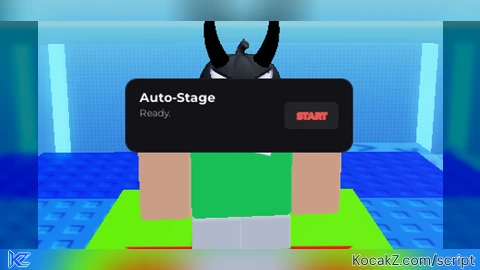
local ScreenGui = Instance.new("ScreenGui")
ScreenGui.Name = "AutoStage"
ScreenGui.ResetOnSpawn = false
ScreenGui.ZIndexBehavior = Enum.ZIndexBehavior.Sibling

pcall(function() ScreenGui.Parent = CoreGui end)
if not ScreenGui.Parent then ScreenGui.Parent = LocalPlayer:WaitForChild("PlayerGui") end

local MainFrame = Instance.new("Frame")
MainFrame.Name = "MainFrame"
MainFrame.BackgroundColor3 = Config.Colors.BgCard
MainFrame.BorderSizePixel = 0
MainFrame.Position = UDim2.new(0.5, -125, 0.85, 0)
MainFrame.Size = UDim2.new(0, 250, 0, 80)
MainFrame.Parent = ScreenGui

local Corner = Instance.new("UICorner")
Corner.CornerRadius = UDim.new(0, 12)
Corner.Parent = MainFrame

local Stroke = Instance.new("UIStroke")
Stroke.Color = Color3.fromRGB(35, 35, 42)
Stroke.Thickness = 1
Stroke.Parent = MainFrame

local Title = Instance.new("TextLabel")
Title.Name = "Title"
Title.BackgroundTransparency = 1
Title.Position = UDim2.new(0, 15, 0, 10)
Title.Size = UDim2.new(1, -30, 0, 20)
Title.Font = Enum.Font.GothamBold
Title.Text = "Auto-Stage"
Title.TextColor3 = Config.Colors.TextPrimary
Title.TextSize = 16
Title.TextXAlignment = Enum.TextXAlignment.Left
Title.Parent = MainFrame

local Status = Instance.new("TextLabel")
Status.Name = "Status"
Status.BackgroundTransparency = 1
Status.Position = UDim2.new(0, 15, 0, 30)
Status.Size = UDim2.new(1, -30, 0, 15)
Status.Font = Enum.Font.Gotham
Status.Text = "Ready."
Status.TextColor3 = Config.Colors.TextSecondary
Status.TextSize = 12
Status.TextXAlignment = Enum.TextXAlignment.Left
Status.Parent = MainFrame

local ToggleBtn = Instance.new("TextButton")
ToggleBtn.Name = "Toggle"
ToggleBtn.BackgroundColor3 = Color3.fromRGB(35, 35, 40)
ToggleBtn.AnchorPoint = Vector2.new(1, 0.5)
ToggleBtn.Position = UDim2.new(1, -15, 0.5, 0)
ToggleBtn.Size = UDim2.new(0, 60, 0, 30)
ToggleBtn.Font = Enum.Font.GothamBold
ToggleBtn.Text = "START"
ToggleBtn.TextColor3 = Config.Colors.Accent
ToggleBtn.TextSize = 11
ToggleBtn.AutoButtonColor = false
ToggleBtn.Parent = MainFrame

local BtnCorner = Instance.new("UICorner")
BtnCorner.CornerRadius = UDim.new(0, 6)
BtnCorner.Parent = ToggleBtn

local BtnStroke = Instance.new("UIStroke")
BtnStroke.Color = Config.Colors.Accent
BtnStroke.Thickness = 1
BtnStroke.Parent = ToggleBtn

--------------------------------------------------------------------------------
-- LOGIC
--------------------------------------------------------------------------------
local Farming = false

local function TweenObj(obj, props, time)
    TweenService:Create(obj, TweenInfo.new(time or 0.3, Enum.EasingStyle.Quint), props):Play()
end

local function GetCurrentStage()
    local stats = LocalPlayer:FindFirstChild("playerstats")
    if stats then
        local stage = stats:GetAttribute("Stage")
        if stage then
            return tonumber(stage)
        end
    end
    return 1
end

local function DoTeleport()
    task.spawn(function()
        while Farming and ScreenGui.Parent do
            local currentStage = GetCurrentStage()
            local nextStageNum = currentStage + 1

            if currentStage >= Config.MaxStage then
                Farming = false
                Status.Text = "Max stage reached!"
                TweenObj(ToggleBtn, {BackgroundColor3 = Config.Colors.BgDark})
                ToggleBtn.Text = "DONE"
                break
            end

            local targetPartName = tostring(nextStageNum)
            local targetPart = Config.StagesPath:FindFirstChild(targetPartName)

            if targetPart and targetPart:IsA("BasePart") then
                local char = LocalPlayer.Character
                if char and char:FindFirstChild("HumanoidRootPart") then
                    Status.Text = "Farming: Stage " .. tostring(nextStageNum) .. "/" .. Config.MaxStage

                    local targetCFrame = targetPart.CFrame + Vector3.new(0, 3, 0)

                    char:PivotTo(targetCFrame)

                    if char:FindFirstChild("HumanoidRootPart") then
                        char.HumanoidRootPart.AssemblyLinearVelocity = Vector3.zero
                        char.HumanoidRootPart.AssemblyAngularVelocity = Vector3.zero
                    end
                end
            else
                Status.Text = "Waiting for Stage " .. targetPartName .. "..."
            end

            task.wait(Config.TeleportDelay)
        end

        if not Farming then
            TweenObj(ToggleBtn, {BackgroundColor3 = Color3.fromRGB(35, 35, 40), TextColor3 = Config.Colors.Accent})
            TweenObj(BtnStroke, {Color = Config.Colors.Accent})
            ToggleBtn.Text = "START"
            if GetCurrentStage() < Config.MaxStage then
                Status.Text = "Paused at Stage " .. GetCurrentStage()
            end
        end
    end)
end

ToggleBtn.MouseButton1Click:Connect(function()
    Farming = not Farming

    if Farming then
        ToggleBtn.Text = "STOP"
        TweenObj(ToggleBtn, {BackgroundColor3 = Config.Colors.Accent, TextColor3 = Color3.new(1,1,1)})
        TweenObj(BtnStroke, {Color = Config.Colors.Accent})
        DoTeleport()
    else
        ToggleBtn.Text = "STOPPING..."
    end
end)

local Dragging, DragInput, DragStart, StartPos

local function Update(input)
    local delta = input.Position - DragStart
    MainFrame.Position = UDim2.new(StartPos.X.Scale, StartPos.X.Offset + delta.X, StartPos.Y.Scale, StartPos.Y.Offset + delta.Y)
end

MainFrame.InputBegan:Connect(function(input)
    if input.UserInputType == Enum.UserInputType.MouseButton1 or input.UserInputType == Enum.UserInputType.Touch then
        Dragging = true
        DragStart = input.Position
        StartPos = MainFrame.Position

        input.Changed:Connect(function()
            if input.UserInputState == Enum.UserInputState.End then
                Dragging = false
            end
        end)
    end
end)

MainFrame.InputChanged:Connect(function(input)
    if input.UserInputType == Enum.UserInputType.MouseMovement or input.UserInputType == Enum.UserInputType.Touch then
        DragInput = input
    end
end)

UserInputService.InputChanged:Connect(function(input)
    if input == DragInput and Dragging then
        Update(input)
    end
end)
Features & Information
Auto Stage GUI Only For 1 Game
Community Comments (0)
No comments yet for this script.