
Key Required
local Rayfield = loadstring(game:HttpGet('https://sirius.menu/rayfield'))()

local Window = Rayfield:CreateWindow({
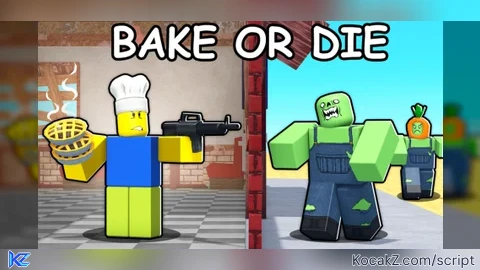
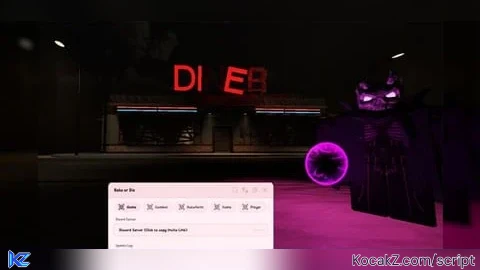
   Name = "Bake or Die",
   LoadingTitle = "Bake or Die Interface",
   LoadingSubtitle = "Loaded Successfully",
   ConfigurationSaving = {
      Enabled = true,
      FolderName = "BakeOrDie",
      FileName = "BakeConfig"
   },
   Discord = {
      Enabled = false,
      RememberJoins = true
   },
   KeySystem = false,
})

-- Load ZAP module
local ZAP = require(game:GetService("ReplicatedStorage").Client.ClientRemotes)

-- Services
local Players = game:GetService("Players")
local RunService = game:GetService("RunService")

-- ESP Variables
local ESPFolder = Instance.new("Folder")
ESPFolder.Name = "ESP"
ESPFolder.Parent = game.CoreGui

-- ESP Settings
local ESPConfig = {
    MonsterESP = false,
    ItemESP = false,
    ShowNames = true,
    ShowDistance = true,
    ShowHighlight = true
}

-- Combat Tab
local CombatTab = Window:CreateTab("Combat", 4483362458)

local CombatSection = CombatTab:CreateSection("Kill Aura")

local KillAuraToggle = CombatTab:CreateToggle({
   Name = "Kill Aura",
   CurrentValue = false,
   Flag = "KillAuraToggle",
   Callback = function(Value)
      _G.KillAuraEnabled = Value
   end,
})

local AuraDistanceSlider = CombatTab:CreateSlider({
   Name = "Kill Aura Distance",
   Range = {10, 50},
   Increment = 5,
   Suffix = "Studs",
   CurrentValue = 25,
   Flag = "AuraDistance",
   Callback = function(Value)
      _G.AuraDistance = Value
   end,
})

local KillAllButton = CombatTab:CreateButton({
   Name = "Kill All Zombies",
   Callback = function()
      local character = Players.LocalPlayer.Character
      if character and character:FindFirstChild("HumanoidRootPart") then
          for _, monster in pairs(workspace.Monsters:GetChildren()) do
              if monster:FindFirstChild("HumanoidRootPart") then
                  ZAP.meleeAttack.fire({
                      monsters = {monster},
                      civilians = {},
                      activeSlot = _G.WeaponSlot or 2
                  })
                  task.wait(0.1)
              end
          end
      end
   end,
})

-- Items Tab
local ItemsTab = Window:CreateTab("Items", 4483362458)

local ItemsSection = ItemsTab:CreateSection("Item Management")

local BringBodiesButton = ItemsTab:CreateButton({
   Name = "Bring Bodies",
   Callback = function()
      local character = Players.LocalPlayer.Character
      if character and character.PrimaryPart then
          for _, v in pairs(workspace.Interactables:GetChildren()) do
              if v:IsA("Model") and v:FindFirstChild("HumanoidRootPart") and not v:FindFirstChild("ProductPriceTag") then
                  v.PrimaryPart.CFrame = character.PrimaryPart.CFrame
                  task.wait(0.05)
              end
          end
      end
   end,
})

local BringAllItemsButton = ItemsTab:CreateButton({
   Name = "Bring All Items",
   Callback = function()
      local character = Players.LocalPlayer.Character
      if character and character.PrimaryPart then
          for _, v in pairs(workspace.Interactables:GetChildren()) do
              if v:IsA("Model") and not v:FindFirstChild("ProductPriceTag") and v.PrimaryPart then
                  v.PrimaryPart.CFrame = character.PrimaryPart.CFrame
                  task.wait(0.05)
              end
          end
      end
   end,
})

-- Player Tab
local PlayerTab = Window:CreateTab("Player", 4483362458)

local PlayerSection = PlayerTab:CreateSection("Character Settings")

local WalkSpeedSlider = PlayerTab:CreateSlider({
   Name = "WalkSpeed",
   Range = {16, 200},
   Increment = 5,
   Suffix = "Speed",
   CurrentValue = 16,
   Flag = "WalkSpeed",
   Callback = function(Value)
      _G.WalkSpeed = Value
      local character = Players.LocalPlayer.Character
      if character and character:FindFirstChild("Humanoid") then
          character.Humanoid.WalkSpeed = Value
      end
   end,
})

local JumpPowerSlider = PlayerTab:CreateSlider({
   Name = "JumpPower",
   Range = {50, 200},
   Increment = 10,
   Suffix = "Power",
   CurrentValue = 50,
   Flag = "JumpPower",
   Callback = function(Value)
      _G.JumpPower = Value
      local character = Players.LocalPlayer.Character
      if character and character:FindFirstChild("Humanoid") then
          character.Humanoid.JumpPower = Value
      end
   end,
})

local SlotDropdown = PlayerTab:CreateDropdown({
   Name = "Weapon Slot",
   Options = {"1", "2", "3", "4", "5", "6", "7", "8", "9", "10"},
   CurrentOption = "2",
   Flag = "WeaponSlot",
   Callback = function(Option)
      _G.WeaponSlot = tonumber(Option)
   end,
})

-- ESP Tab
local ESPTab = Window:CreateTab("ESP", 4483362458)

local ESPSection = ESPTab:CreateSection("ESP Types")

local MonsterESPToggle = ESPTab:CreateToggle({
   Name = "Monster ESP",
   CurrentValue = false,
   Flag = "MonsterESP",
   Callback = function(Value)
      ESPConfig.MonsterESP = Value
      UpdateESP()
   end,
})

local ItemESPToggle = ESPTab:CreateToggle({
   Name = "Item ESP",
   CurrentValue = false,
   Flag = "ItemESP",
   Callback = function(Value)
      ESPConfig.ItemESP = Value
      UpdateESP()
   end,
})

local ESPSettingsSection = ESPTab:CreateSection("ESP Settings")

local ShowNamesToggle = ESPTab:CreateToggle({
   Name = "Show Names",
   CurrentValue = true,
   Flag = "ShowNames",
   Callback = function(Value)
      ESPConfig.ShowNames = Value
      UpdateESP()
   end,
})

local ShowDistanceToggle = ESPTab:CreateToggle({
   Name = "Show Distance",
   CurrentValue = true,
   Flag = "ShowDistance",
   Callback = function(Value)
      ESPConfig.ShowDistance = Value
      UpdateESP()
   end,
})

local ShowHighlightToggle = ESPTab:CreateToggle({
   Name = "Show Highlight",
   CurrentValue = true,
   Flag = "ShowHighlight",
   Callback = function(Value)
      ESPConfig.ShowHighlight = Value
      UpdateESP()
   end,
})

-- ESP Functions
function CreateESP(part, color, name, distance)
    local espGroup = {}

    -- Billboard GUI for text
    if ESPConfig.ShowNames or ESPConfig.ShowDistance then
        local billboard = Instance.new("BillboardGui")
        billboard.Name = name .. "_Billboard"
        billboard.Adornee = part
        billboard.Size = UDim2.new(0, 200, 0, 50)
        billboard.StudsOffset = Vector3.new(0, 3, 0)
        billboard.AlwaysOnTop = true
        billboard.Parent = ESPFolder

        local textLabel = Instance.new("TextLabel")
        textLabel.Size = UDim2.new(1, 0, 1, 0)
        textLabel.BackgroundTransparency = 1
        textLabel.Text = ""

        if ESPConfig.ShowNames and ESPConfig.ShowDistance then
            textLabel.Text = name .. "\n" .. math.floor(distance) .. " studs"
        elseif ESPConfig.ShowNames then
            textLabel.Text = name
        elseif ESPConfig.ShowDistance then
            textLabel.Text = math.floor(distance) .. " studs"
        end

        textLabel.TextColor3 = color
        textLabel.TextSize = 14
        textLabel.Font = Enum.Font.GothamBold
        textLabel.TextStrokeTransparency = 0
        textLabel.TextStrokeColor3 = Color3.new(0, 0, 0)
        textLabel.Parent = billboard

        table.insert(espGroup, billboard)
    end

    -- Highlight
    if ESPConfig.ShowHighlight then
        local highlight = Instance.new("Highlight")
        highlight.Name = name .. "_Highlight"
        highlight.Adornee = part
        highlight.FillColor = color
        highlight.OutlineColor = Color3.new(1, 1, 1)
        highlight.FillTransparency = 0.3
        highlight.OutlineTransparency = 0
        highlight.DepthMode = Enum.HighlightDepthMode.AlwaysOnTop
        highlight.Parent = ESPFolder
        table.insert(espGroup, highlight)
    end

    return espGroup
end

function ClearESP()
    for _, child in pairs(ESPFolder:GetChildren()) do
        child:Destroy()
    end
end

function UpdateESP()
    ClearESP()

    local character = Players.LocalPlayer.Character
    if not character or not character:FindFirstChild("HumanoidRootPart") then return end
    local playerRoot = character.HumanoidRootPart

    -- Monster ESP
    if ESPConfig.MonsterESP then
        for _, monster in pairs(workspace.Monsters:GetChildren()) do
            if monster:IsA("Model") then
                -- Try to find any valid part for highlighting
                local targetPart = monster:FindFirstChild("HumanoidRootPart") or monster:FindFirstChild("Head") or monster.PrimaryPart
                if targetPart then
                    local distance = (playerRoot.Position - targetPart.Position).Magnitude
                    CreateESP(targetPart, Color3.fromRGB(255, 50, 50), "Monster: " .. monster.Name, distance)
                end
            end
        end
    end

    -- Item ESP (Bodies and Items)
    if ESPConfig.ItemESP then
        for _, item in pairs(workspace.Interactables:GetChildren()) do
            if item:IsA("Model") then
                -- Check if it's a body (has HumanoidRootPart) or regular item (no price tag)
                local isBody = item:FindFirstChild("HumanoidRootPart")
                local isItem = not item:FindFirstChild("ProductPriceTag")

                if isBody or isItem then
                    local targetPart = item:FindFirstChild("HumanoidRootPart") or item.PrimaryPart
                    if targetPart then
                        local distance = (playerRoot.Position - targetPart.Position).Magnitude
                        local espName = isBody and "Body: " .. item.Name or "Item: " .. item.Name
                        local espColor = isBody and Color3.fromRGB(255, 165, 0) or Color3.fromRGB(50, 255, 50)
                        CreateESP(targetPart, espColor, espName, distance)
                    end
                end
            end
        end
    end
end

-- Info Tab
local InfoTab = Window:CreateTab("Info", 4483362458)

local InfoSection = InfoTab:CreateSection("Information")

local InfoParagraph = InfoTab:CreateParagraph({
   Title = "Bake or Die Script",
   Content = "• Kill Aura with adjustable distance\n• Kill All Zombies button\n• Bring Bodies & Items\n• WalkSpeed & JumpPower sliders\n• Monster & Item ESP (can be both on)\n• ESP Settings: Names, Distance, Highlight\n• Weapon slot selection"
})

-- Kill Aura Loop
task.spawn(function()
    while true do
        task.wait()
        if _G.KillAuraEnabled then
            local character = Players.LocalPlayer.Character
            if character and character:FindFirstChild("HumanoidRootPart") then
                local root = character.HumanoidRootPart
                local slot = _G.WeaponSlot or 2
                local distance = _G.AuraDistance or 25

                for _, monster in pairs(workspace.Monsters:GetChildren()) do
                    if monster:FindFirstChild("HumanoidRootPart") then
                        local monsterDistance = (root.Position - monster.HumanoidRootPart.Position).Magnitude
                        if monsterDistance < distance then
                            ZAP.meleeAttack.fire({
                                monsters = {monster},
                                civilians = {},
                                activeSlot = slot
                            })
                            break
                        end
                    end
                end
            end
        end
    end
end)

-- Character Stats Loop
task.spawn(function()
    while true do
        task.wait(1)
        local character = Players.LocalPlayer.Character
        if character and character:FindFirstChild("Humanoid") then
            if _G.WalkSpeed then
                character.Humanoid.WalkSpeed = _G.WalkSpeed
            end
            if _G.JumpPower then
                character.Humanoid.JumpPower = _G.JumpPower
            end
        end
    end
end)

-- ESP Update Loop
task.spawn(function()
    while true do
        task.wait(0.5)
        if ESPConfig.MonsterESP or ESPConfig.ItemESP then
            UpdateESP()
        else
            ClearESP()
        end
    end
end)

-- Notification
Rayfield:Notify({
   Title = "Bake or Die Script Loaded",
   Content = "All features are now available!",
   Duration = 5,
   Image = 4483362458,
   Actions = {
      Ignore = {
         Name = "Okay!",
         Callback = function()
         print("Bake or Die Script is ready!")
      end
   },
},
})
gjh
@graalpixel ?
@BeboMods eiii a aura de morte não esta funcionando
@BeboMods Make the kill aura work always, otherwise it only works until a certain night.
@graalpixel how to use kill aura frist go to player tab set weapon slot to 1 and importan:put any melee weapon to ur 2 so it work now enjoy
Good work
why is it a empty tab
Why not working?
@Phonk what are you using what's your exploit
@BeboMods uhh i why can't i use it on mobile
Dude this script is coool Kill aura, bring all items - everything works smooth Just kinda annoying when all the stuff piles up in one spot Would be sick if there was at least some item sorting, like food separated, so you dont have to dig through a bunch of meat and tomatoes to find a carrot Still super solid just a sorting tweak would make it perfect
@pakupt ima do it when I am home dm me on discord bebomods
@pakupt ai can't do it i think
I can also do auto bake maybe do recipes as well I can automate everything
solara empty tab
@DuyVn can you dm me I will try to make it compatible with solara My discord is bebomods
Kill aura doesn't work on xeno :(
Thank you!
Can you fix kill aura its dont works anymore ;-;
@umutemir3878 to use kill aura u need to go to player then put weapon slot to 1 make any melee weapon to ur 2 slot
Made update for script!!!!Its not working!!!
Bring bodies not working. Need bring all ingredients
How to activate the script
The kill aura And the kill all zombies doesn't work
@Manoso hey to use kill aura go to ur player make the weapon thing into 1 after that make any melee weapon to ur 2 slot and use kill aura
its blank on solara executer
Kill aura dosent work
not working on jjsploit
kill aura and kill all never worked
Kill Aura isnt working
Bruh kill Aura dosent work fix
Not working on low UNC executors
@Cryptidaphobia verdade não esta funcionando mais a aura de morte você sabe o discord dele? Você ja conversou com ele
Sometimes kill aura and kill all works. After night 5-7, it stop working.
I want to report a issue I was using yarhm to fly and yarhm no clip to go to the final boss I activated rafield kill aura the boss health didn't go down so I want to fix that issue possible
I have to copy and paste everything, right? Why isn't it working?
kill aura is currently not working
Kill aura not working in mobile
Bro empty tab
kill aura bugs and dont work
Why does kill aura doesn't work I'm using Delta
The kill aura not working
🤔
ahh every one to use kill aura go to ur player tab put make ur weapon slot to 1 and put any melee weapon to ur 2 slot more the damage of that melee weapon more damage the kill aura do
Do it work on Delta and is there key?
Por que não está funcionando?
ONLY KILL AURA AND S* BRING WORKS
thanks to this I update this bro it has unlimited ammo and auto aim