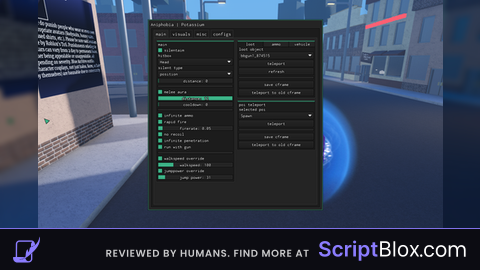
Keyless
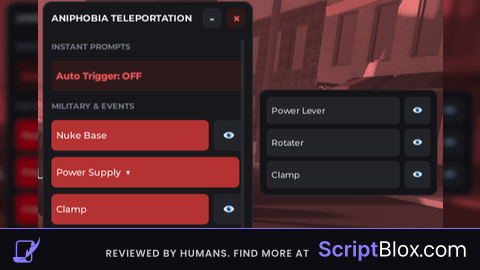
local Players = game:GetService("Players")
local LocalPlayer = Players.LocalPlayer
local TweenService = game:GetService("TweenService")
local UserInputService = game:GetService("UserInputService")
local Workspace = game:GetService("Workspace")

-- 1. Main UI Elements
local ScreenGui = Instance.new("ScreenGui")
ScreenGui.Name = "FancyHubGUI"
ScreenGui.ResetOnSpawn = false
ScreenGui.Parent = LocalPlayer:WaitForChild("PlayerGui")

-- Main Frame (The Panel)
local MainFrame = Instance.new("Frame")
MainFrame.Size = UDim2.new(0, 260, 0, 570)
MainFrame.Position = UDim2.new(0.5, -130, 0.4, -285)
MainFrame.BackgroundColor3 = Color3.fromRGB(24, 24, 28)
MainFrame.BorderSizePixel = 0
MainFrame.Active = true
MainFrame.ClipsDescendants = false
MainFrame.Parent = ScreenGui

local UICorner = Instance.new("UICorner")
UICorner.CornerRadius = UDim.new(0, 10)
UICorner.Parent = MainFrame

local UIStroke = Instance.new("UIStroke")
UIStroke.Color = Color3.fromRGB(45, 45, 52)
UIStroke.Thickness = 1
UIStroke.Parent = MainFrame

-- Title Bar Frame
local TitleBar = Instance.new("Frame")
TitleBar.Size = UDim2.new(1, 0, 0, 40)
TitleBar.BackgroundTransparency = 1
TitleBar.Parent = MainFrame

-- Title Text
local Title = Instance.new("TextLabel")
Title.Size = UDim2.new(1, -70, 1, 0)
Title.Position = UDim2.new(0, 10, 0, 0)
Title.BackgroundTransparency = 1
Title.Text = "ANIPHOBIA TELEPORTATION"
Title.TextColor3 = Color3.fromRGB(240, 240, 245)
Title.TextSize = 13
Title.Font = Enum.Font.GothamBold
Title.TextXAlignment = Enum.TextXAlignment.Left
Title.Parent = TitleBar

-- Red 'X' Close Button
local CloseButton = Instance.new("TextButton")
CloseButton.Size = UDim2.new(0, 24, 0, 24)
CloseButton.Position = UDim2.new(1, -32, 0.5, -12)
CloseButton.BackgroundColor3 = Color3.fromRGB(45, 25, 25)
CloseButton.Text = "×"
CloseButton.TextColor3 = Color3.fromRGB(240, 90, 90)
CloseButton.TextSize = 18
CloseButton.Font = Enum.Font.GothamBold
CloseButton.Parent = TitleBar

local CloseCorner = Instance.new("UICorner")
CloseCorner.CornerRadius = UDim.new(0, 6)
CloseCorner.Parent = CloseButton

local CloseStroke = Instance.new("UIStroke")
CloseStroke.Color = Color3.fromRGB(80, 35, 35)
CloseStroke.Thickness = 1
CloseStroke.Parent = CloseButton

-- Gray '-' Minimize Button
local MinimizeButton = Instance.new("TextButton")
MinimizeButton.Size = UDim2.new(0, 24, 0, 24)
MinimizeButton.Position = UDim2.new(1, -62, 0.5, -12)
MinimizeButton.BackgroundColor3 = Color3.fromRGB(35, 35, 42)
MinimizeButton.Text = "-"
MinimizeButton.TextColor3 = Color3.fromRGB(200, 200, 205)
MinimizeButton.TextSize = 18
MinimizeButton.Font = Enum.Font.GothamBold
MinimizeButton.Parent = TitleBar

local MinCorner = Instance.new("UICorner")
MinCorner.CornerRadius = UDim.new(0, 6)
MinCorner.Parent = MinimizeButton

local MinStroke = Instance.new("UIStroke")
MinStroke.Color = Color3.fromRGB(55, 55, 62)
MinStroke.Thickness = 1
MinStroke.Parent = MinimizeButton

-- Container for buttons (Scrolling)
local Container = Instance.new("ScrollingFrame")
Container.Size = UDim2.new(1, -20, 1, -50)
Container.Position = UDim2.new(0, 10, 0, 45)
Container.BackgroundTransparency = 1
Container.BorderSizePixel = 0
Container.ScrollBarThickness = 4
Container.ScrollBarImageColor3 = Color3.fromRGB(60, 60, 70)
Container.CanvasSize = UDim2.new(0, 0, 0, 0)
Container.Parent = MainFrame

local UIListLayout = Instance.new("UIListLayout")
UIListLayout.SortOrder = Enum.SortOrder.LayoutOrder
UIListLayout.Padding = UDim.new(0, 8)
UIListLayout.Parent = Container

UIListLayout:GetPropertyChangedSignal("AbsoluteContentSize"):Connect(function()
    Container.CanvasSize = UDim2.new(0, 0, 0, UIListLayout.AbsoluteContentSize.Y + 10)
end)

-- The Static Submenu Container Frame (Stays completely still)
local SubMenu = Instance.new("Frame")
SubMenu.Size = UDim2.new(0, 220, 0, 130)
SubMenu.Position = UDim2.new(1, 10, 0, 110)
SubMenu.BackgroundColor3 = Color3.fromRGB(20, 20, 24)
SubMenu.BorderSizePixel = 0
SubMenu.ZIndex = 0
SubMenu.Visible = false
SubMenu.ClipsDescendants = true -- Strictly cuts off the buttons when they slide out
SubMenu.Parent = MainFrame

local SubCorner = Instance.new("UICorner")
SubCorner.CornerRadius = UDim.new(0, 8)
SubCorner.Parent = SubMenu

local SubStroke = Instance.new("UIStroke")
SubStroke.Color = Color3.fromRGB(40, 40, 48)
SubStroke.Thickness = 1
SubStroke.Parent = SubMenu

-- The Sliding Content Window (This canvas slides from right to left inside the frame)
local SubContentCanvas = Instance.new("Frame")
SubContentCanvas.Size = UDim2.new(1, 0, 1, 0)
SubContentCanvas.Position = UDim2.new(1, 0, 0, 0) -- Starts completely off-screen to the right
SubContentCanvas.BackgroundTransparency = 1
SubContentCanvas.Parent = SubMenu

local SubLayout = Instance.new("UIListLayout")
SubLayout.SortOrder = Enum.SortOrder.LayoutOrder
SubLayout.Padding = UDim.new(0, 6)
SubLayout.Parent = SubContentCanvas

local SubPadding = Instance.new("UIPadding")
SubPadding.PaddingTop = UDim.new(0, 8)
SubPadding.PaddingBottom = UDim.new(0, 8)
SubPadding.PaddingLeft = UDim.new(0, 8)
SubPadding.PaddingRight = UDim.new(0, 8)
SubPadding.Parent = SubContentCanvas

-- 2. Visual Tweens
CloseButton.MouseEnter:Connect(function()
    TweenService:Create(CloseButton, TweenInfo.new(0.15), {BackgroundColor3 = Color3.fromRGB(180, 50, 50), TextColor3 = Color3.fromRGB(255, 255, 255)}):Play()
end)
CloseButton.MouseLeave:Connect(function()
    TweenService:Create(CloseButton, TweenInfo.new(0.15), {BackgroundColor3 = Color3.fromRGB(45, 25, 25), TextColor3 = Color3.fromRGB(240, 90, 90)}):Play()
end)
CloseButton.MouseButton1Click:Connect(function()
    ScreenGui:Destroy()
end)

local isMinimized = false
local originalHeight = 570

MinimizeButton.MouseEnter:Connect(function()
    TweenService:Create(MinimizeButton, TweenInfo.new(0.15), {BackgroundColor3 = Color3.fromRGB(55, 55, 65)}):Play()
end)
MinimizeButton.MouseLeave:Connect(function()
    TweenService:Create(MinimizeButton, TweenInfo.new(0.15), {BackgroundColor3 = Color3.fromRGB(35, 35, 42)}):Play()
end)

MinimizeButton.MouseButton1Click:Connect(function()
    isMinimized = not isMinimized
    local targetHeight = isMinimized and 40 or originalHeight
    local tweenInfo = TweenInfo.new(0.3, Enum.EasingStyle.Quad, Enum.EasingDirection.Out)

    TweenService:Create(MainFrame, tweenInfo, {Size = UDim2.new(0, 260, 0, targetHeight)}):Play()

    if isMinimized then
        MinimizeButton.Text = "+"
        Container.Visible = false
        SubMenu.Visible = false
    else
        MinimizeButton.Text = "-"
        task.wait(0.1)
        Container.Visible = true
    end
end)

-- 3. Mechanics (Teleport, Proximity, Camera Tracking)
local currentCamTarget = nil
local cameraPart = nil
local lastPlayerCFrame = nil

local function resetCamera()
    local camera = Workspace.CurrentCamera
    local character = LocalPlayer.Character
    local root = character and character:FindFirstChild("HumanoidRootPart")

    if camera and character and character:FindFirstChild("Humanoid") then
        camera.CameraType = Enum.CameraType.Custom
        camera.CameraSubject = character.Humanoid
        currentCamTarget = nil

        if root then root.Anchored = false end
        if lastPlayerCFrame and root then
            root.CFrame = lastPlayerCFrame
            lastPlayerCFrame = nil
        end
        if cameraPart then
            cameraPart:Destroy()
            cameraPart = nil
        end
    end
end

local function teleport(cframe)
    if currentCamTarget then
        lastPlayerCFrame = nil
        resetCamera()
    end
    local character = LocalPlayer.Character
    if character and character:FindFirstChild("HumanoidRootPart") then
        character.HumanoidRootPart.CFrame = cframe
    end
end

local function viewCoordinate(targetPos)
    local camera = Workspace.CurrentCamera
    local character = LocalPlayer.Character
    local root = character and character:FindFirstChild("HumanoidRootPart")
    if not camera or not root then return end

    if currentCamTarget == targetPos then
        resetCamera()
        return
    end

    if not lastPlayerCFrame then lastPlayerCFrame = root.CFrame end
    currentCamTarget = targetPos
    if cameraPart then cameraPart:Destroy() end

    cameraPart = Instance.new("Part")
    cameraPart.Size = Vector3.new(1, 1, 1)
    cameraPart.Position = targetPos
    cameraPart.Transparency = 1
    cameraPart.Anchored = true
    cameraPart.CanCollide = false
    cameraPart.Parent = Workspace

    camera.CameraType = Enum.CameraType.Watch
    camera.CameraSubject = cameraPart
    camera.Focus = CFrame.new(targetPos)
    camera.CFrame = CFrame.new(targetPos + Vector3.new(0, 10, 20), targetPos)

    root.Anchored = true
    root.CFrame = CFrame.new(targetPos - Vector3.new(0, 20, 0))
end

LocalPlayer.CharacterAdded:Connect(function()
    task.wait(0.1)
    if cameraPart then cameraPart:Destroy() end
    cameraPart = nil
    currentCamTarget = nil
    lastPlayerCFrame = nil
end)

local autoTriggerEnabled = false
local function setupPrompt(prompt)
    if prompt:IsA("ProximityPrompt") then
        prompt.HoldDuration = 0
        prompt.RequiresLineOfSight = false
        prompt.PromptShown:Connect(function()
            if autoTriggerEnabled then
                prompt:InputHoldBegin()
                prompt:InputHoldEnd()
            end
        end)
    end
end

for _, obj in ipairs(workspace:GetDescendants()) do setupPrompt(obj) end
workspace.DescendantAdded:Connect(setupPrompt)

-- 4. UI Creators
local function createSectionLabel(text, layoutOrder)
    local label = Instance.new("TextLabel")
    label.Size = UDim2.new(1, 0, 0, 20)
    label.BackgroundTransparency = 1
    label.Text = text:upper()
    label.TextColor3 = Color3.fromRGB(120, 120, 135)
    label.TextSize = 11
    label.Font = Enum.Font.GothamBold
    label.TextXAlignment = Enum.TextXAlignment.Left
    label.LayoutOrder = layoutOrder
    label.Parent = Container
end

local function createSubMenuButton(name, x, y, z, layoutOrder)
    local RowFrame = Instance.new("Frame")
    RowFrame.Size = UDim2.new(1, 0, 0, 34)
    RowFrame.BackgroundTransparency = 1
    RowFrame.LayoutOrder = layoutOrder
    RowFrame.Parent = SubContentCanvas

    local button = Instance.new("TextButton")
    button.Size = UDim2.new(1, -38, 1, 0)
    button.BackgroundColor3 = Color3.fromRGB(35, 35, 42)
    button.Text = "  " .. name
    button.TextColor3 = Color3.fromRGB(220, 220, 225)
    button.TextSize = 12
    button.Font = Enum.Font.GothamMedium
    button.TextXAlignment = Enum.TextXAlignment.Left
    button.Parent = RowFrame

    local btnCorner = Instance.new("UICorner")
    btnCorner.CornerRadius = UDim.new(0, 5)
    btnCorner.Parent = button

    local camButton = Instance.new("TextButton")
    camButton.Size = UDim2.new(0, 32, 1, 0)
    camButton.Position = UDim2.new(1, -32, 0, 0)
    camButton.BackgroundColor3 = Color3.fromRGB(35, 35, 42)
    camButton.Text = "👁️"
    camButton.TextColor3 = Color3.fromRGB(180, 180, 185)
    camButton.TextSize = 12
    camButton.Font = Enum.Font.GothamMedium
    camButton.Parent = RowFrame

    local camCorner = Instance.new("UICorner")
    camCorner.CornerRadius = UDim.new(0, 5)
    camCorner.Parent = camButton

    button.MouseEnter:Connect(function() TweenService:Create(button, TweenInfo.new(0.2), {BackgroundColor3 = Color3.fromRGB(48, 48, 58)}):Play() end)
    button.MouseLeave:Connect(function() TweenService:Create(button, TweenInfo.new(0.2), {BackgroundColor3 = Color3.fromRGB(35, 35, 42)}):Play() end)
    camButton.MouseEnter:Connect(function() TweenService:Create(camButton, TweenInfo.new(0.2), {BackgroundColor3 = Color3.fromRGB(48, 48, 58), TextColor3 = Color3.fromRGB(255, 255, 255)}):Play() end)
    camButton.MouseLeave:Connect(function() TweenService:Create(camButton, TweenInfo.new(0.2), {BackgroundColor3 = Color3.fromRGB(35, 35, 42), TextColor3 = Color3.fromRGB(180, 180, 185)}):Play() end)

    button.MouseButton1Click:Connect(function() teleport(CFrame.new(x, y + 3, z)) end)
    camButton.MouseButton1Click:Connect(function() viewCoordinate(Vector3.new(x, y, z)) end)
end

local function createTeleportButton(name, x, y, z, isSpecial, layoutOrder, isExpandable)
    local RowFrame = Instance.new("Frame")
    RowFrame.Size = UDim2.new(1, 0, 0, 38)
    RowFrame.BackgroundTransparency = 1
    RowFrame.LayoutOrder = layoutOrder
    RowFrame.Parent = Container

    local button = Instance.new("TextButton")
    button.Size = isExpandable and UDim2.new(1, -6, 1, 0) or UDim2.new(1, -44, 1, 0)
    button.BackgroundColor3 = isSpecial and Color3.fromRGB(180, 50, 50) or Color3.fromRGB(35, 35, 42)
    button.Text = isExpandable and "  " .. name .. "  ▶" or "  " .. name
    button.TextColor3 = Color3.fromRGB(255, 255, 255)
    button.TextSize = 13
    button.Font = Enum.Font.GothamMedium
    button.TextXAlignment = Enum.TextXAlignment.Left
    button.Parent = RowFrame

    local btnCorner = Instance.new("UICorner")
    btnCorner.CornerRadius = UDim.new(0, 6)
    btnCorner.Parent = button

    local baseColor = button.BackgroundColor3
    local targetColor = isSpecial and Color3.fromRGB(210, 60, 60) or Color3.fromRGB(45, 45, 55)

    button.MouseEnter:Connect(function() TweenService:Create(button, TweenInfo.new(0.2), {BackgroundColor3 = targetColor}):Play() end)
    button.MouseLeave:Connect(function() TweenService:Create(button, TweenInfo.new(0.2), {BackgroundColor3 = baseColor}):Play() end)

    if not isExpandable then
        local camButton = Instance.new("TextButton")
        camButton.Size = UDim2.new(0, 38, 1, 0)
        camButton.Position = UDim2.new(1, -38, 0, 0)
        camButton.BackgroundColor3 = Color3.fromRGB(35, 35, 42)
        camButton.Text = "👁️"
        camButton.TextColor3 = Color3.fromRGB(200, 200, 205)
        camButton.TextSize = 14
        camButton.Font = Enum.Font.GothamMedium
        camButton.Parent = RowFrame

        local camCorner = Instance.new("UICorner")
        camCorner.CornerRadius = UDim.new(0, 6)
        camCorner.Parent = camButton

        camButton.MouseEnter:Connect(function() TweenService:Create(camButton, TweenInfo.new(0.2), {BackgroundColor3 = Color3.fromRGB(45, 45, 55), TextColor3 = Color3.fromRGB(255, 255, 255)}):Play() end)
        camButton.MouseLeave:Connect(function() TweenService:Create(camButton, TweenInfo.new(0.2), {BackgroundColor3 = Color3.fromRGB(35, 35, 42), TextColor3 = Color3.fromRGB(200, 200, 205)}):Play() end)

        camButton.MouseButton1Click:Connect(function() viewCoordinate(Vector3.new(x, y, z)) end)
    end

    local subMenuOpen = false
    button.MouseButton1Click:Connect(function()
        if isExpandable then
            subMenuOpen = not subMenuOpen
            local tweenInfo = TweenInfo.new(0.35, Enum.EasingStyle.Quad, Enum.EasingDirection.Out)

            if subMenuOpen then
                SubMenu.Visible = true
                button.Text = "  " .. name .. "  ▼"
                -- Wiper Effect: The canvas inside slides horizontally from UDim2(1, 0) to UDim2(0, 0)
                TweenService:Create(SubContentCanvas, tweenInfo, {Position = UDim2.new(0, 0, 0, 0)}):Play()
            else
                button.Text = "  " .. name .. "  ▶"
                -- Slide Out: Moves inner items back to the right out of view
                local slideOutTween = TweenService:Create(SubContentCanvas, tweenInfo, {Position = UDim2.new(1, 0, 0, 0)})
                slideOutTween:Play()
                slideOutTween.Completed:Connect(function()
                    if not subMenuOpen then SubMenu.Visible = false end
                end)
            end
        else
            teleport(CFrame.new(x, y + 3, z))
        end
    end)
end

local function createToggleAllButton(layoutOrder)
    local button = Instance.new("TextButton")
    button.Size = UDim2.new(1, 0, 0, 38)
    button.BackgroundColor3 = Color3.fromRGB(45, 25, 25)
    button.Text = "  Auto Trigger: OFF"
    button.TextColor3 = Color3.fromRGB(240, 90, 90)
    button.TextSize = 13
    button.Font = Enum.Font.GothamBold
    button.TextXAlignment = Enum.TextXAlignment.Left
    button.LayoutOrder = layoutOrder
    button.Parent = Container

    local btnCorner = Instance.new("UICorner")
    btnCorner.CornerRadius = UDim.new(0, 6)
    btnCorner.Parent = button

    local stroke = Instance.new("UIStroke")
    stroke.Color = Color3.fromRGB(80, 35, 35)
    stroke.Thickness = 1
    stroke.Parent = button

    button.MouseButton1Click:Connect(function()
        autoTriggerEnabled = not autoTriggerEnabled
        if autoTriggerEnabled then
            button.Text = "  Auto Trigger: ON"
            button.BackgroundColor3 = Color3.fromRGB(25, 45, 25)
            button.TextColor3 = Color3.fromRGB(90, 240, 90)
            stroke.Color = Color3.fromRGB(35, 80, 35)
        else
            button.Text = "  Auto Trigger: OFF"
            button.BackgroundColor3 = Color3.fromRGB(45, 25, 25)
            button.TextColor3 = Color3.fromRGB(240, 90, 90)
            stroke.Color = Color3.fromRGB(80, 35, 35)
        end
    end)
end

-- 5. Build the Menu Structure
createSectionLabel("Instant Prompts", 0)
createToggleAllButton(1)

createSectionLabel("Military & Events", 2)
createTeleportButton("Nuke Base", -8745, 222, -3842, true, 3)
createTeleportButton("Power Supply", -5041, 269, 1043, true, 4, true)
createTeleportButton("Clamp", -8767, 192, -3785, true, 5)

-- Populate the Sliding Submenu Panel with your 3 specific locations
createSubMenuButton("Power Lever", -5039, 269, 1043, 0)
createSubMenuButton("Rotater", -5265, 283, 836, 1)
createSubMenuButton("Clamp", -5458, 270, 997, 2)

createSectionLabel("Key Section", 6)
createTeleportButton("Casino", 4481, 703, -1203, false, 7)
createTeleportButton("Garage", 4810, 215, -3432, false, 8)
createTeleportButton("Train", -6465, 268, 2222, false, 9)
createTeleportButton("Camp", -6796, 213, -4514, false, 10)
createTeleportButton("Storage Lot", 3950, 215, -4593, false, 11)

createSectionLabel("Code Section", 12)
createTeleportButton("Mil. Armory", -6917, 213, -4397, false, 13)
createTeleportButton("Gas Station", -7255, 213, -2341, false, 14)
createTeleportButton("Mansion", 735, 212, -4106, false, 15)
createTeleportButton("House Riot", -3672, 212, -2586, false, 16)
createTeleportButton("Mil. Storage", -8662, 257, -3775, false, 17)
createTeleportButton("Radio Station", 1720, 729, -636, false, 18)

-- 6. Smooth Dragging Script
local dragging, dragInput, dragStart, startPos

local function update(input)
    local delta = input.Position - dragStart
    MainFrame.Position = UDim2.new(startPos.X.Scale, startPos.X.Offset + delta.X, startPos.Y.Scale, startPos.Y.Offset + delta.Y)
end

MainFrame.InputBegan:Connect(function(input)
    if input.UserInputType == Enum.UserInputType.MouseButton1 or input.UserInputType == Enum.UserInputType.Touch then
        dragging = true
        dragStart = input.Position
        startPos = MainFrame.Position

        input.Changed:Connect(function()
            if input.UserInputState == Enum.UserInputState.End then
                dragging = false
            end
        end)
    end
end)

MainFrame.InputChanged:Connect(function(input)
    if input.UserInputType == Enum.UserInputType.MouseMovement or input.UserInputType == Enum.UserInputType.Touch then
        dragInput = input
    end
end)

UserInputService.InputChanged:Connect(function(input)
    if input == dragInput and dragging then
        update(input)
    end
end)No comments yet for this script.