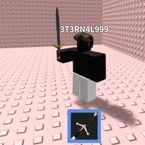

Key Required
local a=game:GetService("Players")
local b=game:GetService("ReplicatedStorage")
local c=game:GetService("UserInputService")
local d=a.LocalPlayer
if d.PlayerGui:FindFirstChild("AdminSkillGUI") then d.PlayerGui:FindFirstChild("AdminSkillGUI"):Destroy() return end

local function decode(str) return string.gsub(str, ".", function(c) return string.char(c:byte()-1) end) end
local t={}
t.gpn=function(p) p=p:lower() for _,pl in ipairs(a:GetPlayers()) do if pl.Name:lower():sub(1,#p)==p then return pl end end return nil end
t.fs=function(s,tg) b:WaitForChild("SkillEvent"):FireServer(s,tg) end
t.mr=function(s) b:WaitForChild("MorphRequest"):FireServer(s) end

local g=Instance.new("ScreenGui",d:WaitForChild("PlayerGui"))
g.Name="AdminSkillGUI" g.ResetOnSpawn=false

local bt=Instance.new("TextButton",g)
bt.Size=UDim2.new(0,100,0,30)
bt.Position=UDim2.new(0,10,0,10)
bt.BackgroundColor3=Color3.fromRGB(30,30,30)
bt.TextColor3=Color3.new(1,1,1)
bt.TextScaled=true bt.Text="Open GUI"

local mf=Instance.new("Frame",g)
mf.Size=UDim2.new(0,200,0,320)
mf.Position=UDim2.new(0,10,0,50)
mf.BackgroundColor3=Color3.fromRGB(35,35,35)
mf.Visible=false mf.Active=true

local db=Instance.new("TextLabel",mf)
db.Size=UDim2.new(1,0,0,25)
db.BackgroundColor3=Color3.fromRGB(45,45,45)
db.TextColor3=Color3.new(1,1,1)
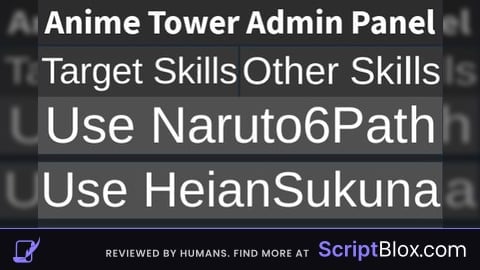
db.Text = "Anime Tower Admin Panel"
db.TextScaled=true db.Font=Enum.Font.SourceSansBold db.Name="DragBar" db.Active=true

local tabs={{Name="Target Skills",Frame=nil},{Name="Other Skills",Frame=nil}}

for i,v in ipairs(tabs) do
	local tabBtn=Instance.new("TextButton",mf)
	tabBtn.Size=UDim2.new(0.5,0,0,25)
	tabBtn.Position=UDim2.new((i-1)*0.5,0,0,25)
	tabBtn.BackgroundColor3=Color3.fromRGB(55,55,55)
	tabBtn.TextColor3=Color3.new(1,1,1)
	tabBtn.Text=v.Name
	tabBtn.TextScaled=true

	local frame=Instance.new("ScrollingFrame",mf)
	frame.Position=UDim2.new(0,0,0,50)
	frame.Size=UDim2.new(1,0,1,-50)
	frame.CanvasSize=UDim2.new(0,0,0,0)
	frame.AutomaticCanvasSize=Enum.AutomaticSize.Y
	frame.ScrollBarThickness=6
	frame.BackgroundTransparency=1
	frame.Visible=i==1
	v.Frame=frame

	local layout=Instance.new("UIListLayout",frame)
	layout.Padding=UDim.new(0,4)
	layout.SortOrder=Enum.SortOrder.LayoutOrder

	tabBtn.MouseButton1Click:Connect(function()
		for _,t in ipairs(tabs) do t.Frame.Visible=false end
		v.Frame.Visible=true
	end)
end

local dragging,dragInput,dragStart,startPos
local function update(input)
	local delta=input.Position-dragStart
	mf.Position=UDim2.new(startPos.X.Scale,startPos.X.Offset+delta.X,startPos.Y.Scale,startPos.Y.Offset+delta.Y)
end

db.InputBegan:Connect(function(i)
	if i.UserInputType==Enum.UserInputType.MouseButton1 or i.UserInputType==Enum.UserInputType.Touch then
		dragging=true dragStart=i.Position startPos=mf.Position
		i.Changed:Connect(function() if i.UserInputState==Enum.UserInputState.End then dragging=false end end)
	end
end)
db.InputChanged:Connect(function(i) if i.UserInputType==Enum.UserInputType.MouseMovement or i.UserInputType==Enum.UserInputType.Touch then dragInput=i end end)
c.InputChanged:Connect(function(i) if i==dragInput and dragging then update(i) end end)

local function addTargetSkill(frame,label,skill,morph)
	local l=Instance.new("TextLabel",frame)
	l.Size=UDim2.new(1,0,0,18)
	l.BackgroundTransparency=1
	l.TextColor3=Color3.new(1,1,1)
	l.TextScaled=true
	l.Text=label

	local box=Instance.new("TextBox",frame)
	box.Size=UDim2.new(1,0,0,25)
	box.BackgroundColor3=Color3.fromRGB(60,60,60)
	box.TextColor3=Color3.new(1,1,1)
	box.PlaceholderText="Player Name"
	box.ClearTextOnFocus=false
	box.TextScaled=true

	local btn=Instance.new("TextButton",frame)
	btn.Size=UDim2.new(1,0,0,28)
	btn.BackgroundColor3=Color3.fromRGB(80,80,80)
	btn.TextColor3=Color3.new(1,1,1)
	btn.TextScaled=true
	btn.Text="Use "..skill
	btn.MouseButton1Click:Connect(function()
		local pl=t.gpn(box.Text)
		if pl then
			t.fs(skill,pl)
			if morph then t.mr(skill) end
		end
	end)
end

local function addInstantSkill(frame,display,morph,custom)
	local btn=Instance.new("TextButton",frame)
	btn.Size=UDim2.new(1,0,0,28)
	btn.BackgroundColor3=Color3.fromRGB(80,80,80)
	btn.TextColor3=Color3.new(1,1,1)
	btn.TextScaled=true
	btn.Text="Use "..display
	btn.MouseButton1Click:Connect(function()
		local s=custom or display
		t.fs(s)
		if morph then t.mr(s) end
	end)
end


addTargetSkill(tabs[1].Frame,"Swap Player","Sasuke6Path",true)
addTargetSkill(tabs[1].Frame,"Bring Player","Pain",false)
addTargetSkill(tabs[1].Frame,"Admin Gojo Power","SuperGojo",true)
addTargetSkill(tabs[1].Frame,"Pull and Fling","Gojo",true)
addTargetSkill(tabs[1].Frame,"Dismantle Player","Sukuna",true)


addInstantSkill(tabs[2].Frame,"Naruto6Path",true)
addInstantSkill(tabs[2].Frame,"HeianSukuna",true)
addInstantSkill(tabs[2].Frame,"Gogeta",false)
addInstantSkill(tabs[2].Frame,"Kokushibo",true)
addInstantSkill(tabs[2].Frame,"SungJinWoo",true)


local credit=Instance.new("TextLabel",tabs[2].Frame)
credit.Size=UDim2.new(1,0,0,18)
credit.BackgroundTransparency=1
credit.TextColor3=Color3.fromRGB(150,150,150)
credit.TextScaled=true
credit.Text="Made By 3T3RN4L999"

bt.MouseButton1Click:Connect(function()
	mf.Visible=not mf.Visible
	bt.Text=mf.Visible and "Close GUI" or "Open GUI"
end)
ts is so * 🔥 (* = peak)
Patched sometime today, but it seems like the ones that u can equip normally are still working. For example if u don't have vip can't use vip characters but if u have them unlocked then the script works